AI Virtual Renovation — Show a Fixer-Upper's Potential
Show the potential of a property that needs work — turn a dated or worn listing photo into a renovation concept, side-by-side with the real photo. The model is constrained to preserve permanent property geometry, but every result still needs comparison with the original before publishing.
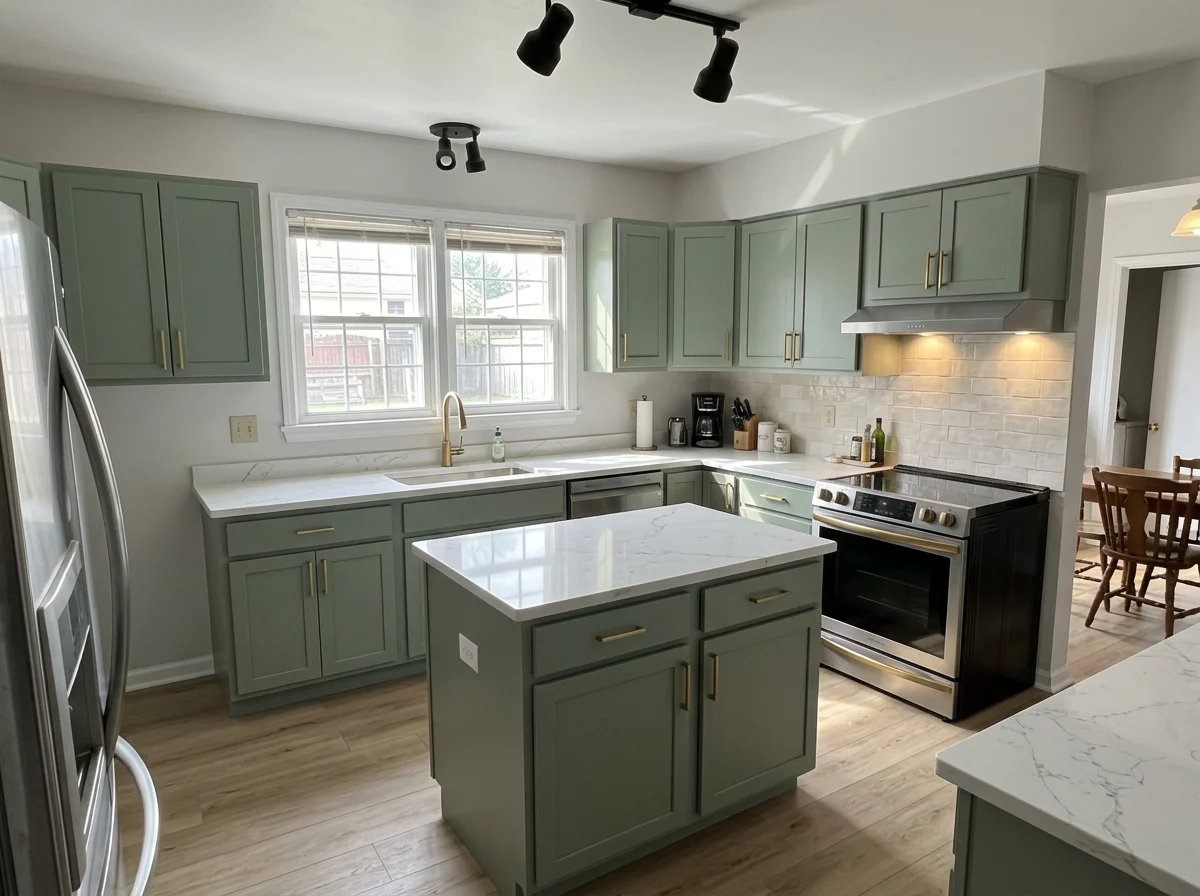 Concept
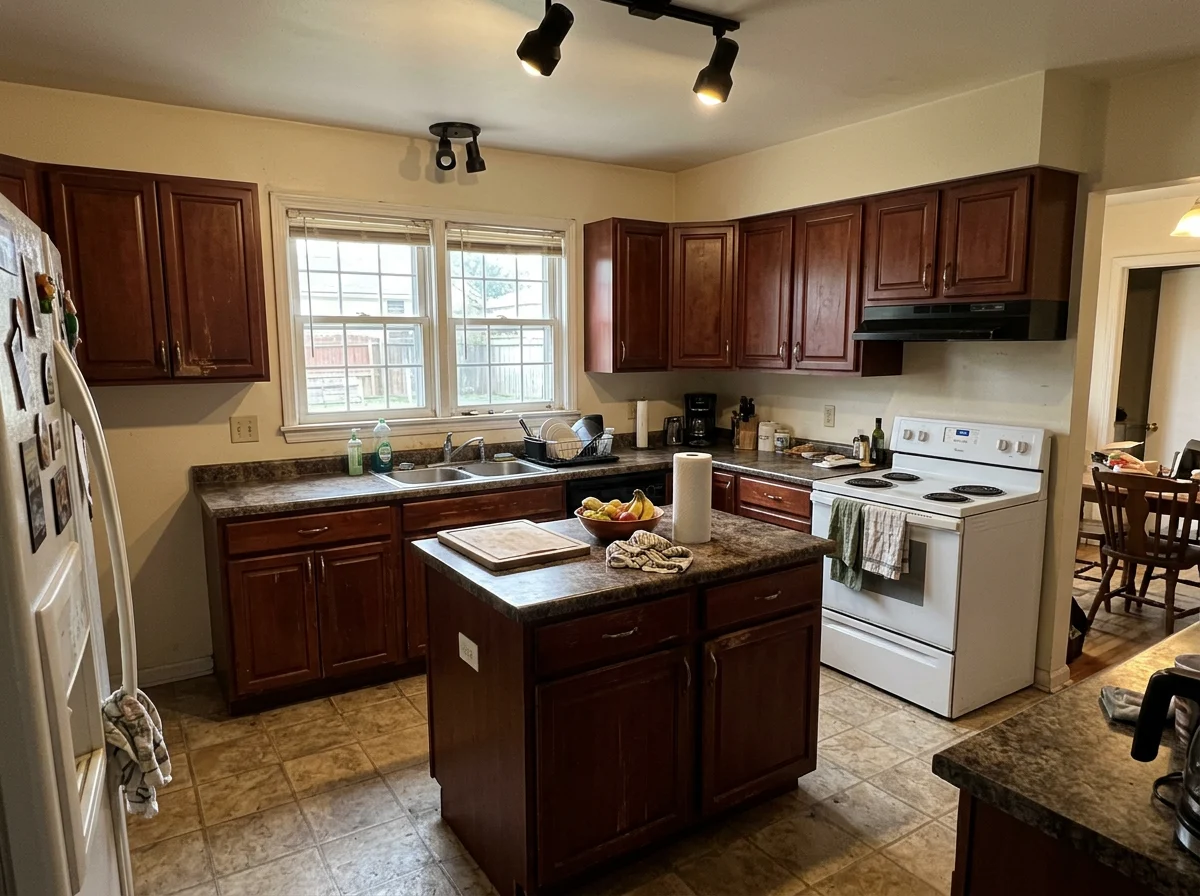 Original
What is a virtual renovation?
A virtual renovation is an AI-edited listing photo that shows what a dated or worn room could look like after a remodel — new finishes, flooring and paint — while the walls, windows, square footage and layout are meant to be left as they are. Real estate agents use it to market fixer-uppers and dated listings, shown side-by-side with the real photo. It's a concept of the potential, not a fake listing.
Dated bathroom → renovated
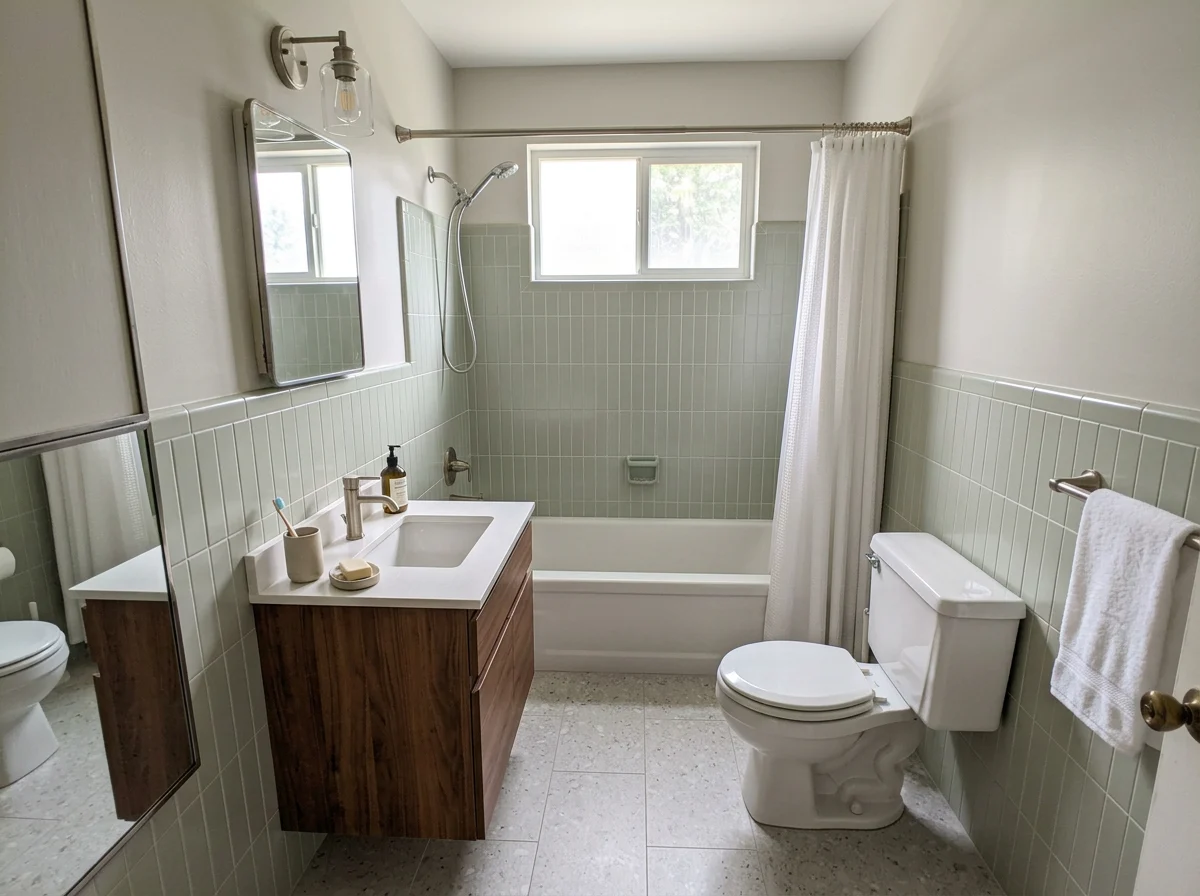 Concept
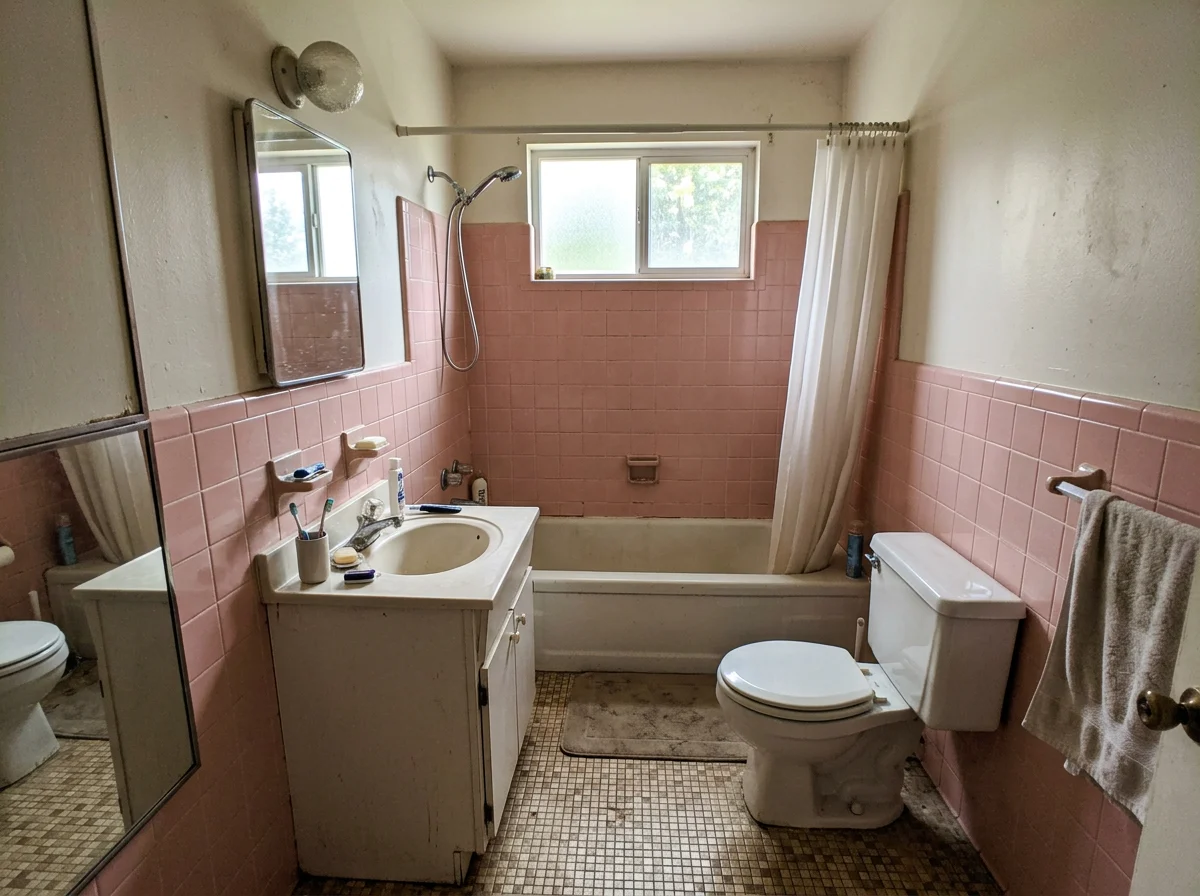 Original
Worn living room → refreshed
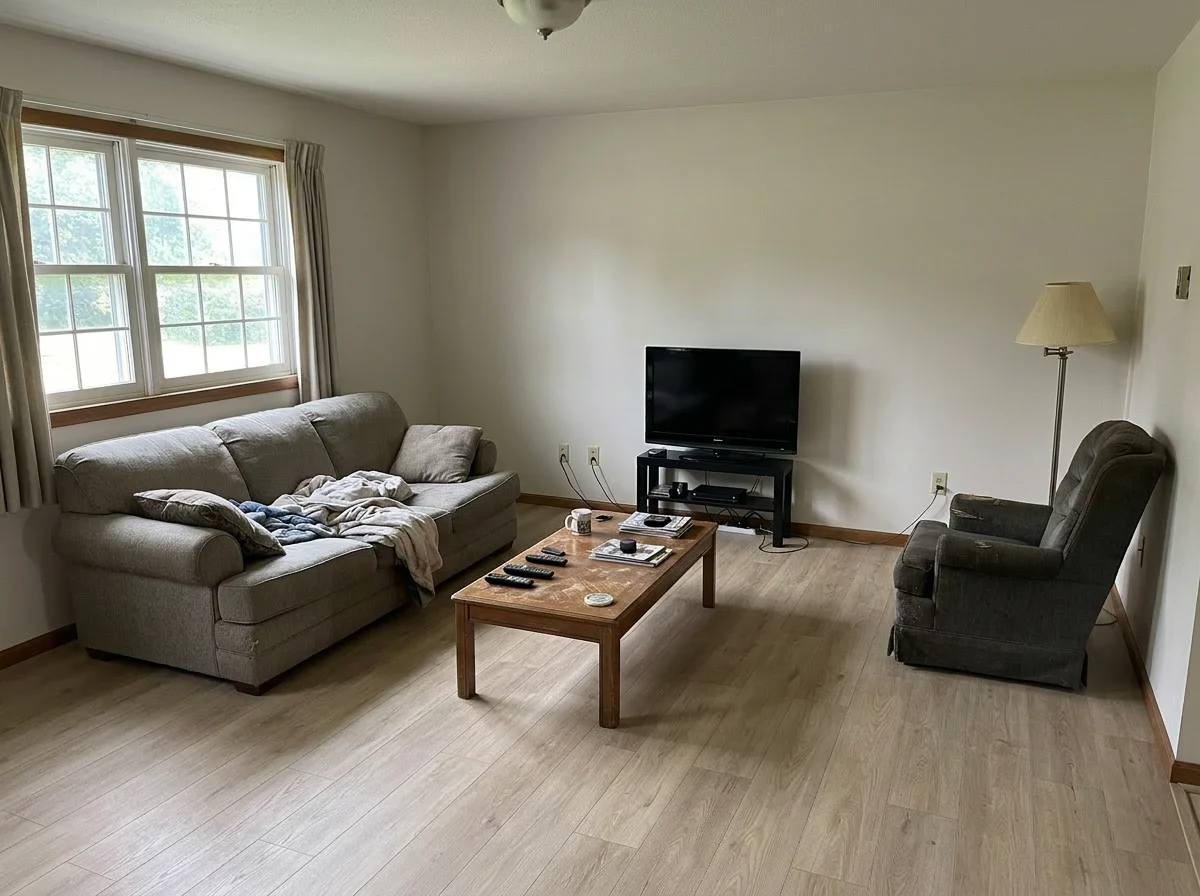 Concept
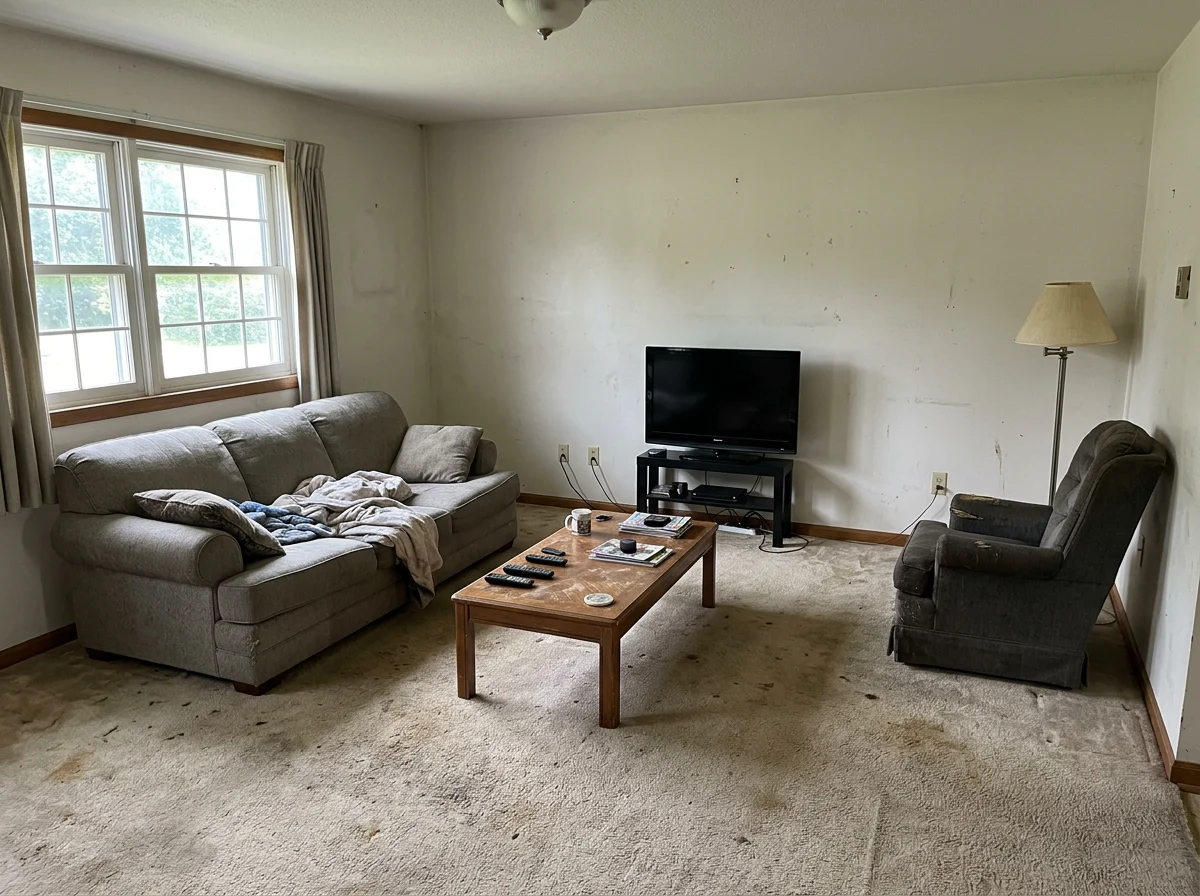 Original
A concept of the potential — not a fake listing
Geometry stays true
The model is constrained to update finishes and surfaces rather than permanent property geometry. Compare walls, windows, square footage, layout, and camera angle with the original before publishing.
Always side-by-side
The real photo is shown next to the concept and can't be hidden. Defects in the original stay visible — never covered up.
Built for the new rules
Aligned with NAR Standard of Practice 12-10 and California AB 723 (effective Jan 1, 2026) disclosure expectations for AI-altered images.
How to disclose a renovation concept (and stay MLS-safe)
A renovation concept is treated as illustrative, not the property's current condition — as long as you show it beside the real photo, label it, and never hide a defect. Here's the simple, defensible way to do it.
Copy-paste into your listing remarks:
One or more photos are AI renovation concepts shown for illustration only. They depict potential, not current condition. Original photos available on request.
Show the original beside it
Post the concept next to the real photo (the tool forces this) and keep the unedited original on file.
Label the concept
Caption it "AI Renovation Concept". The watermark is unremovable by design and the filename carries a -renovation-concept marker.
Keep the original
NAR Standard of Practice 12-10 requires a true picture in advertising and prohibits misleading images; California AB 723 (effective Jan 1, 2026) requires a conspicuous disclosure on or next to the image plus a way to reach the unaltered original.
Never hide a defect
Updating finishes is fine. Covering water stains, cracks, mold, or structural damage is misrepresentation — the tool won't do it and neither should you.
This is practical guidance, not legal advice. Always follow your local MLS rules and your broker's policy.
Manual editors charge per photo and make you wait
Why buyers can't see the potential of a fixer-upper
Most buyers can't look at a dated kitchen or a tired bathroom and picture it renovated — they see the work, not the result, and scroll past. A renovation concept does the imagining for them: same room, same walls and windows, just modern finishes — shown right next to the real photo so it's honest, not a bait-and-switch. Manual editors charge $30–220 per photo and take 5–7 days; doing it instantly means you can list a fixer-upper with its upside visible the same day, instead of dropping the price because nobody can see past the avocado tile.
What you can virtually renovate
Virtual kitchen remodel
Modernize a tired kitchen — new cabinetry, countertops, backsplash and finishes. Cabinet runs and the island keep their exact position and footprint.
Virtual bathroom remodel
Update a dated bathroom — vanity, tile, shower and fixtures get a modern finish while the layout, tub and toilet positions stay put.
Virtual flooring & paint refresh
For a dated-but-intact room: replace worn flooring and repaint walls. Furniture, fixtures and layout stay exactly where they are. Add an optional finish hint like "modern white" — structural requests are stripped automatically.
What it's great at — and what it's not built for
Great at
- ✓Refresh: repainting walls and updating flooring on a dated but intact room
- ✓Renovate: modernizing a tired kitchen or bathroom — cabinets, counters, tile, finishes
- ✓Keeping walls, windows, layout, square footage and camera angle in place
- ✓Phone photos and standard listing shots of the room as it really is
Not built for (yet)
- —Moving walls or opening up a layout — by design, it won't
- —Empty shells / gutted rooms with no kitchen or bath to renovate yet
- —Hiding defects (cracks, water stains, mold) — by design, it won't
- —Exterior, landscaping, or structural changes
How it works
Upload a dated room photo. Get a modern renovation concept back.
Drop a dated room photo. JPG or PNG, any resolution.
Finishes, fixtures, and surfaces — refreshed in ~30 seconds. Structure untouched.
High-res renovation concept. MLS-ready, no watermark, geometry preserved.
Drop a dated room photo. JPG or PNG, any resolution.
Finishes, fixtures, and surfaces — refreshed in ~30 seconds. Structure untouched.
High-res renovation concept. MLS-ready, no watermark, geometry preserved.
Virtual renovation vs virtual staging — which do you need?
They solve different problems and share one credit pool — most fixer-upper listings use both.
| Virtual Renovation | Virtual Staging | |
|---|---|---|
| Starting room | Dated / worn — furnished or empty | Empty or sparsely furnished |
| What it changes | Finishes: paint, flooring, cabinets, tile, fixtures | Adds furniture & decor |
| Best for | Fixer-uppers & dated listings buyers can't see past | Vacant rooms buyers can't picture furnished |
| Room geometry | Designed to preserve; review | Designed to preserve; review |
The combined play: virtually renovate the tired room first, then stage the renovated result — same upload, same credit pool.
Renovated the room? Stage it in one click.
Virtual Renovation and Virtual Staging share the same credit pool. Show the renovated potential, then furnish it for buyers — no new subscription, no re-upload.
Open Virtual Staging →Questions agents ask before they start
Quick answers to common questions about AI virtual staging.
Built to be trusted — by design
No testimonials needed — every safeguard below is something you can verify the moment you use it.
- The real photo is always shown side-by-side and can't be hidden
- An "AI Renovation Concept" watermark is baked in and can't be removed
- Designed to preserve walls, windows, square footage and layout — review against the original
- Visible defects — cracks, water stains, mould — are never erased
- Structural requests typed into the style box are automatically stripped
- Downloads carry a -renovation-concept filename; the original stays downloadable
- Aligned with NAR Standard of Practice 12-10 and California AB 723 (Jan 1, 2026)
- 3 photos free with an account — no card. Verify it before you trust it.
Show the potential — free
3 photos free with an account and no credit card. A renovation concept beside the real photo, typically in about 30 seconds.