Virtual staging companies now sell three different products under the same name: self-service AI software, designer-reviewed photo services, and specialist 3D or Matterport staging. The best choice depends on your listing volume, deadline, room complexity, revision needs, and whether several angles must look consistent.
This guide compares 10 providers using their current public pricing, service model, published turnaround, revision policy, workflow, and best-fit use case. It is designed to help agents, real estate photographers, listing marketers, and small teams build a shortlist without treating unlike services as interchangeable.
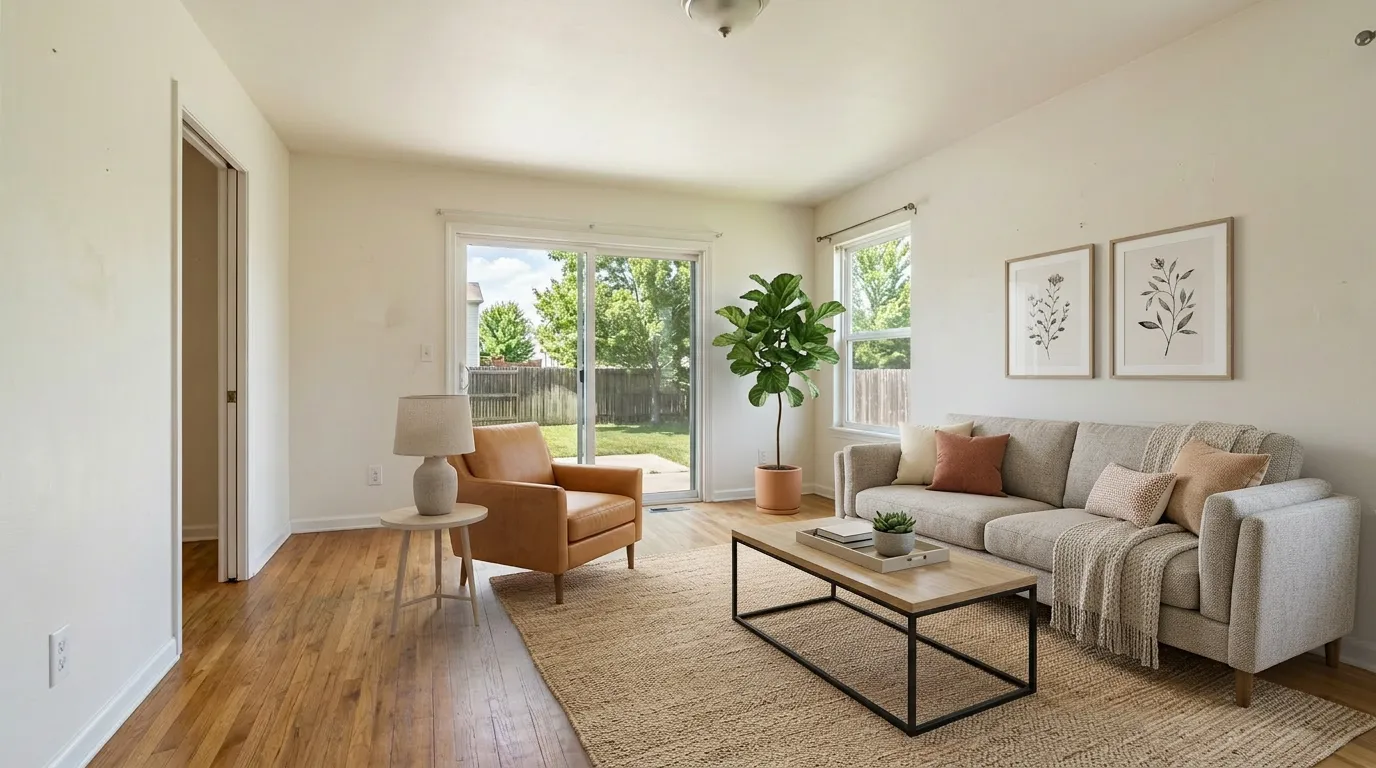 BeforeAfter
Disclosure and methodology: VirtualStaging.tools is our product and appears in this comparison. We have not run a controlled same-photo test across all 10 providers for this edition, so this is not an image-quality scorecard. “Best fit” labels are based on documented pricing, features, service model, and workflow rather than a laboratory ranking. Pricing and product details were checked against provider websites on August 3, 2026. Written and reviewed by Evan Ye, founder of VirtualStaging.tools.
Quick comparison
| Company | Service model | Published pricing | Turnaround | Revisions | Best fit |
|---|---|---|---|---|---|
| VirtualStaging.tools | Self-service AI | $25/mo for 36 photos; $13/mo billed yearly | About 30 sec | In-app regeneration | Agents and small teams needing predictable volume |
| BoxBrownie | Human-edited service | About $24–$30/photo, depending on active regional pricing | 48 hr | Unlimited changes advertised | One-off listings needing a service workflow |
| Virtual Staging AI | Self-service AI | From $16/mo billed yearly for 6 photos | About 10 sec | Unlimited renders advertised | Fast, single-purpose AI staging |
| ApplyDesign | DIY editor + one-click service | DIY $7–$10/photo; one-click $10.50–$15/photo | About 10–15 min | Unlimited revisions advertised | Photographers wanting manual control or multi-angle tools |
| REimagineHome | AI visualization platform | Plans advertised from $14/mo; Essential includes 30 credits and Pro 200 | Not guaranteed on pricing page | Each new generation uses a credit | Broad redesign, exterior, and visualization workflows |
| AI HomeDesign | AI staging + photo editing | $35/mo for 30 photos; $19/mo billed yearly | Fast AI workflow | Free regenerations advertised | High-volume users wanting several photo-editing tools |
| Stuccco | Human designer service | $35/photo pay as you go; $28 or $24.50 with prepaid bundles | 24 hr or less advertised | Unlimited revisions | Human-designed residential staging with clear service terms |
| Styldod | Human-edited service | $23/photo under 8 images; $16/photo for 8+ | 24–48 hr | Unlimited revisions | Multi-image orders and related listing-media services |
| roOomy | Designer-led photo + Matterport staging | $49/photo without rework; $69 with rework; Matterport from $434 | Project-based | Paid tier with rework available | Matterport tours, luxury listings, and 3D workflows |
| PadStyler | AI + bespoke design services | Order-based; a current partner offer lists $29/photo | Same-day delivery available | Unlimited revisions advertised | Buyers who want bespoke services and a price-match promise |
Prices are not directly comparable until you account for billing. A low annual per-image rate may require a 12-month commitment, while a human service charges only for the images ordered. Confirm the checkout total and current terms before buying.
Which type of virtual staging company should you choose?
Choose self-service AI when
- you stage listings regularly and need results the same day;
- your rooms are conventional residential spaces with usable source photos;
- low per-image cost and fast iteration matter more than designer involvement;
- someone on your team can inspect every output before it is published.
Choose a designer-reviewed service when
- the listing is high value or has unusual architecture;
- you want to brief a person and request changes in plain language;
- several photos need a consistent style and furnishing direction;
- waiting one or two days is acceptable.
Choose a specialist 3D or Matterport service when
- the deliverable is an interactive tour rather than a set of flat photos;
- you need custom renovation visualization or a developer-grade presentation;
- price and turnaround matter less than a specialized workflow.
Looking only for browser-based self-service tools? Our best virtual staging software comparison focuses on software controls, subscriptions, and AI workflows rather than done-for-you companies.
How we compared these companies
We used six purchasing criteria that can be checked without pretending every provider sells the same product:
- Service model: self-service AI, DIY editing, human review, or specialist 3D production.
- Real billing basis: monthly subscription, annual commitment, prepaid bundle, per-photo fee, or project quote.
- Published turnaround: what the company promises before an order is placed.
- Revision policy: whether retries, reworks, or human revisions are included.
- Workflow coverage: staging only, or staging plus furniture removal, renovation, 360-degree images, Matterport, and other listing media.
- Best-fit customer: solo agent, photographer, small team, luxury listing, or specialist project.
We do not assign output-quality scores in this edition. Marketing galleries, customer reviews, and vendor claims can help you form a shortlist, but the safest buying step is still to try the same difficult listing photo with two or three finalists before committing to an annual plan or a large order.
What matters more than the headline price
Cost per usable image
The cheapest advertised rate is often an annual or high-volume rate. Compare the cost at your real monthly volume and include retries, unused credits, rush fees, furniture removal, and revisions.
Architecture preservation
Review every staged image against the original. Check walls, windows, doors, flooring, built-in fixtures, outlets, vents, fireplaces, exterior features, and views through windows. A tool can add attractive furniture and still create a misleading listing image by changing the property itself.
Multi-angle consistency
Single-image AI tools generate each angle independently unless they offer a dedicated multi-view workflow. If the same room appears several times, compare sofa color, chair count, rugs, tables, artwork, and furniture placement across the set.
Revision terms
“Unlimited renders,” “unlimited revisions,” and “complimentary rework” describe different things. Confirm whether you can change a style, correct an artifact, replace furniture, or ask for a new layout without paying again.
The complete listing workflow
An occupied listing may need item removal before staging. An exterior may need twilight conversion. A photographer may need 360-degree output, white-label delivery, or consistent furniture across several angles. Paying more for one coherent workflow can be cheaper than combining multiple vendors.
VirtualStaging.tools — best fit for predictable self-service volume
VirtualStaging.tools is built for agents and small teams that want to stage photos inside a fast browser workflow rather than submit each image to a designer.
Published pricing: Standard is $25/month for 36 photos, Professional is $65/month for 108, and Business is $105/month for 216. Annual billing lowers the displayed monthly equivalent to $13, $39, and $69. The free allowance includes three lifetime photos and currently produces watermarked results.
Useful features: results typically returned in about 30 seconds, 2K output and commercial use on every plan, furniture removal, virtual twilight, virtual renovation, eight staging styles, and watermark-free downloads on paid plans.
Potential limitations: it remains a generative AI workflow. Users should compare every output with the original property photo, and independent generations should not be assumed to preserve identical furniture across multiple angles.
Consider it when: you stage several listings per month, want a known subscription cost, and can review the output yourself before publishing.
Try three photos free or compare current plans.
BoxBrownie — best fit for a familiar human-edited service
BoxBrownie is a pay-as-you-go real estate photo-editing company rather than a self-service AI subscription. Its service menu also includes image enhancement, day-to-dusk conversion, item removal, floor plans, and virtual renovation.
Published pricing: active official pages currently show virtual staging at either $24 or $30 per image, depending on the regional or campaign page displayed. The company advertises a 48-hour turnaround, no subscription, and unlimited changes.
Useful features: human editing, a broad set of related photo services, and a workflow suited to agents who would rather submit a brief than operate software.
Potential limitations: the cost scales with every image, and 48 hours may not suit a same-day listing launch. Confirm the final regional checkout price before ordering.
Consider it when: you have a one-off listing, need several related edits from one vendor, or prefer human handling over instant generation.
For a narrower comparison, see BoxBrownie vs. VirtualStaging.tools.
Virtual Staging AI — best fit for fast, single-purpose AI staging
Virtual Staging AI focuses on automatic staging and furniture removal with a simple subscription model.
Published pricing: annual plans start at $16/month for 6 photos, followed by $19 for 20, $39 for 60, and $79 for 150. The pricing page advertises 10-second turnaround, unlimited renders and downloads, no watermark on paid plans, and furniture removal.
Useful features: fast generation, clear monthly photo allowances, and API access on the enterprise tier.
Potential limitations: the lowest displayed rates require yearly billing, and the entry tier covers only six input photos per month. Confirm monthly pricing separately if you do not want an annual commitment.
Consider it when: you want rapid staging with a narrow, repeatable workflow and already know your expected monthly image volume.
See our Virtual Staging AI comparison for a feature-by-feature view.
ApplyDesign — best fit for manual control and multi-angle workflows
ApplyDesign combines a drag-and-drop DIY editor with a one-click staging service. Its public pages advertise furniture removal, unlimited revisions, 2D and 360-degree support, and multi-angle consistency tools.
Published pricing: Apply Coins cost $7 each when buying 20 or more, $8 for 10–19, and $10 for up to 9. A DIY 2D image uses one coin; one-click 2D staging uses 1.5 coins. The first image is advertised as free.
Useful features: manual furniture placement, 360-degree images, revisions, and more control than a one-click-only generator.
Potential limitations: manual control also means more operator time. One-click staging costs more than the advertised $7 DIY starting price because it uses 1.5 coins.
Consider it when: a photographer or listing marketer wants to adjust furniture directly, stage 360-degree images, or manage several views with more control.
REimagineHome — best fit for broad property visualization
REimagineHome extends beyond residential listing staging into interior redesign, landscaping, exterior visualization, conversational instructions, references, and shoppable-product concepts.
Published pricing: the official pricing page currently advertises plans from $14 to $99 per month. Essential includes 30 credits per month, Pro 200, Advanced 400, and Agency 900. New users receive five free designs, and a standard visualization or staging generation uses one credit. Because the dollar amount is rendered dynamically, confirm the plan price shown at checkout.
Useful features: broad design coverage, conversational controls on higher plans, exterior tools, references, and lower effective credit cost on higher-volume plans.
Potential limitations: it is a general visualization product rather than a narrowly realtor-first workflow. New generations consume credits, so the real cost depends on how many attempts a room needs.
Consider it when: you need interior and exterior visualization beyond basic vacant-room staging, or want to explore several design directions.
AI HomeDesign — best fit for staging plus photo editing
AI HomeDesign combines AI staging with item removal, enhancement, day-to-dusk, renovation tools, and optional human virtual staging.
Published pricing: monthly plans start at $35 for 30 photos, while annual billing lowers that tier to $19/month. Higher annual tiers list $29 for 80 photos and $49 for 200. The company advertises free regenerations.
Useful features: several real estate photo tools under one account, annual volume pricing, credit rollover on eligible plans, API access on enterprise plans, and a separate human service.
Potential limitations: the frequently advertised $0.24 per-photo rate is the effective rate on an annual enterprise plan, not the cost of the entry monthly plan. Free-output and watermark terms should be confirmed before publication.
Consider it when: you regularly need staging, decluttering, enhancement, twilight, and renovation edits rather than staging alone.
Stuccco — best fit for human-designed residential staging
Stuccco positions itself as a done-for-you, human-powered design service with delivery in 24 hours or less.
Published pricing: pay-as-you-go furniture staging is $35 per photo. A $399 prepaid bundle lowers the rate to $28, and a $799 bundle lowers it to $24.50. Bundles expire after 12 months.
Useful features: human design, unlimited revisions, an optional “Virtually Staged” disclosure, a listing page, and published service prices for wall, floor, landscaping, twilight, and enhancement work.
Potential limitations: the discounted rates require significant prepayment. For only a few photos, compare the $35 pay-as-you-go rate rather than the bundle headline.
Consider it when: you want a person to handle design decisions, need a clear 24-hour service promise, or have rooms that have not worked well in automatic tools.
Styldod — best fit for multi-image orders and listing-media add-ons
Styldod provides human-edited virtual staging alongside occupied-to-vacant editing, virtual renovation, floor plans, tours, videos, and commercial staging.
Published pricing: virtual staging costs $23 per image for orders under eight images and $16 per image for eight or more. Standard delivery is 24–48 hours, with paid 24-hour and 12-hour rush options. Unlimited revisions are included.
Useful features: predictable volume pricing, revisions, rush delivery, and a broad service menu that can cover more of a listing package.
Potential limitations: the $16 headline rate requires at least eight images. Rush delivery adds $6 or $12 per image.
Consider it when: you are ordering a full set rather than one hero photo, or want staging and other listing-media services from the same company.
roOomy — best fit for Matterport and specialist 3D staging
roOomy offers both photo staging and Matterport virtual staging. Its pricing separates a lower-cost photo service with no rework from a version that includes rework.
Published pricing: photo staging is $49 without rework or $69 with complimentary rework. Matterport staging starts at $434 for spaces under 700 square feet and rises by floor area.
Useful features: dedicated Matterport workflow, custom design references, object-removal touchups inside Matterport projects, and specialist renovation options.
Potential limitations: it is substantially more expensive than self-service AI and standard per-photo services. Matterport work is priced as a project rather than a normal listing photo.
Consider it when: a 3D tour is central to the listing, you are marketing luxury or development property, or you need a specialist rather than bulk photo staging.
PadStyler — best fit for bespoke work and price matching
PadStyler now promotes both AI design products and bespoke services. Its public virtual-staging page advertises unlimited revisions, a money-back guarantee, price matching, and same-day delivery availability.
Published pricing: the primary service page does not show one stable standard rate. A current partner order page lists virtual staging at $29 per photo, while promotions and order terms vary. Confirm the actual checkout total for your order.
Useful features: bespoke staging, furniture replacement, renovation and rendering services, revisions, and a price-match promise.
Potential limitations: public pricing is less transparent than providers with a single published rate, and promotional prices may not apply to every buyer.
Consider it when: you want a designer-led service, have a competing quote to match, or need renovation and rendering options alongside staging.
Shortlist by use case
| Your requirement | Providers to consider | Why they belong on the shortlist |
|---|---|---|
| Low-cost recurring self-service | VirtualStaging.tools, Virtual Staging AI, AI HomeDesign | Subscription allowances and fast automatic generation |
| Manual furniture control | ApplyDesign | DIY editor, revisions, 2D and 360-degree workflow |
| Broad redesign and exterior visualization | REimagineHome, AI HomeDesign | Tools extend beyond adding furniture to an empty room |
| Human-edited residential photos | BoxBrownie, Stuccco, Styldod, PadStyler | Submit a brief and request revisions instead of operating software |
| Same listing with several related media needs | BoxBrownie, Styldod, AI HomeDesign | Staging plus removal, enhancement, twilight, renovation, or floor plans |
| Matterport or specialist 3D staging | roOomy, Styldod | Dedicated 3D-tour or hotspot services |
| A difficult room AI keeps changing | Stuccco, BoxBrownie, Styldod, PadStyler | Human service and revision workflow |
The shortlist is a starting point, not a universal ranking. Test the same real listing photo with finalists wherever a free trial or low-cost first image is available.
MLS and virtual staging disclosure considerations
Disclosure requirements vary by state, MLS, brokerage, advertising channel, and the type of alteration. A vendor feature cannot guarantee that a listing is compliant in every market.
The NAR 2026 Code of Ethics says REALTORS® must present a true picture in advertising. Standard of Practice 12-10 includes internet images and prohibits manipulation that produces a deceptive or misleading result. The standard was adopted in 2007 and amended in 2018; it was not newly created for virtual staging in 2026.
California’s Business and Professions Code Section 10140.8 took effect January 1, 2026. For covered sales advertising, it requires a conspicuous disclosure on or adjacent to a digitally altered image and access to the original unaltered image through a public page, URL, or QR code. On websites controlled by the broker, salesperson, or their representative, the original must be included or made available through the permitted link workflow. It does not require only one universal side-by-side layout.
Before publishing, confirm:
- whether the image must be labeled as virtually staged or digitally altered;
- whether and where the original photo must be available;
- whether the disclosure must appear on the image, beside it, in remarks, or in more than one place;
- whether your MLS restricts changes to fixtures, finishes, landscaping, views, or permanent property features;
- whether your brokerage has a stricter internal policy.
Keep the original files, inspect every altered image, and confirm current requirements with your MLS or broker. This section is general information, not legal advice.
Frequently Asked Questions
What is the best virtual staging company for most real estate agents?
There is no universal winner. Agents who stage frequently usually benefit from a fast self-service subscription, while a one-off premium or difficult listing may justify a human-edited service. Compare your monthly volume, deadline, revision needs, and whether several angles must stay visually consistent.
What is the difference between a virtual staging company and virtual staging software?
Virtual staging software is normally self-service: upload a photo, choose a style, review the result, and download it. A virtual staging company may instead assign a human designer, manage revisions, and deliver the finished files. Some providers now offer both models.
How much do virtual staging companies charge in 2026?
Self-service AI plans range from low-cost subscriptions to credit-based plans, with effective rates often below a few dollars per image. Human-edited residential services commonly charge about $16 to $35 per image, while specialist photo, renovation, and Matterport projects can cost $49 to several hundred dollars. Always compare the price at your actual volume and billing term.
Which companies offer virtual staging for free?
VirtualStaging.tools offers three lifetime trial photos with watermarked results. ApplyDesign advertises a free first image, REimagineHome offers five free designs, and several AI platforms offer limited trial credits or previews. Check watermark, resolution, storage, and commercial-use terms before placing a free result in a listing.
How fast can virtual staging be delivered?
Self-service AI products advertise results in roughly five seconds to a few minutes. Human-edited services generally publish turnaround times of 24 to 48 hours. Rush delivery may be available for an additional fee, while Matterport and custom renovation projects can take longer.
Do virtual staging companies keep furniture consistent across multiple angles?
Not automatically. Many AI tools generate each image independently. ApplyDesign advertises multi-angle tools, while human services may coordinate a consistent design across an order. Ask the provider directly and inspect every angle before publishing.
Do virtual staging companies handle MLS disclosure for me?
Some products provide labels, disclosure text, original-image storage, or listing pages, but the agent or publisher remains responsible for following the applicable MLS, brokerage, state, and advertising rules. Do not treat a vendor’s “MLS-ready” claim as a legal guarantee.
When should I choose a human virtual staging service instead of AI?
Choose a human service when a room has unusual geometry, difficult reflections, important custom finishes, or several angles that need one coordinated design. Human editing also makes sense when you want to brief a designer and request specific changes rather than review several automatic generations yourself.
Can the same company remove furniture and virtually stage the room?
Yes. BoxBrownie, ApplyDesign, AI HomeDesign, Stuccco, Styldod, and PadStyler publish furniture-removal, occupied-to-vacant, or replacement workflows. Pricing varies: some include removal, while others charge a separate fee or service line.
Sources and update policy
Provider pricing and product details were checked on August 3, 2026 against the official pages linked in each section. Plans, promotions, regional prices, credit rules, and turnaround promises can change without notice. We update material claims when we identify a change and recommend confirming the current checkout terms before an annual purchase or large order.
This comparison covers residential listing workflows. For offices, retail, restaurants, and hospitality spaces, see our commercial virtual staging guide. For individual competitor pages and source notes, browse the virtual staging alternatives hub.
Need a fast self-service option? Try VirtualStaging.tools on three photos before choosing a paid plan. VirtualStaging.tools is the publisher of this comparison.
More from the blog
Related reading
10 Best Real Estate Photo Editing Tools & Services (2026)
Compare 10 real estate photo editing tools and services by pricing, turnaround, editing type, revisions, and best fit for agents and photographers.
Best AI Virtual Staging Tools Compared (2026)
Compare the top AI virtual staging tools for real estate. Side-by-side review of features, pricing, speed, and quality to help you pick the right platform.
Box Brownie vs VirtualStaging.tools: Honest Comparison (2026)
Comparing Box Brownie and VirtualStaging.tools for virtual staging. See pricing, turnaround, quality, and features side by side to pick the right tool.