Full disclosure: We operate VirtualStaging.tools, so we have a clear bias. This comparison is based on (1) each vendor's published pricing page fetched April 23, 2026, (2) sampled Trustpilot reviews from the last 90 days, (3) community discussion on r/realtors and r/RealEstatePhotography, and (4) our internal performance testing on a standardized photo set. We cover 6 AI platforms plus where each earns a recommendation — including places where competitors beat us.
Looking for a broader landscape including human-service staging? See our best virtual staging software guide. For the fundamentals and MLS compliance basics, see our complete virtual staging guide.
AI virtual staging has gone from a novelty to a core part of the real estate marketing toolkit. Instead of paying hundreds of dollars and waiting days for manually staged photos, agents can now upload an empty room and get a fully furnished result in seconds.
But with more tools entering the market, choosing the right one is not straightforward. Each platform takes a slightly different approach to AI staging -- and the differences in speed, quality, pricing, and workflow matter more than you might expect.
This guide compares the leading AI virtual staging tools available in 2026, including their strengths, limitations, and ideal use cases. We also cover what to look for when evaluating any staging platform, and when AI staging makes sense versus traditional alternatives.
What Is AI Virtual Staging?
AI virtual staging uses machine learning models to digitally furnish empty room photos. You upload a photo of a vacant space, select a room type and style, and the AI generates a realistic image with furniture, decor, and lighting adjustments -- typically in under a minute.
This is fundamentally different from traditional virtual staging, where a human designer manually places 3D furniture models into your photo using editing software. That process produces excellent results but takes 24-48 hours and costs significantly more per image.
AI staging platforms have improved rapidly. The best tools now produce output that is largely indistinguishable from manual staging for standard residential rooms. They handle living rooms, bedrooms, kitchens, dining rooms, and home offices reliably. Complex or unusual spaces -- think oddly shaped rooms, heavy clutter, or extreme wide-angle shots -- can still trip up AI models, but these edge cases are shrinking with each generation of the technology.
The key advantages of AI staging over manual staging:
- Speed: Seconds instead of days
- Cost: A fraction of the per-photo price
- Iteration: Try multiple styles instantly instead of submitting revision requests
- Accessibility: No design expertise required
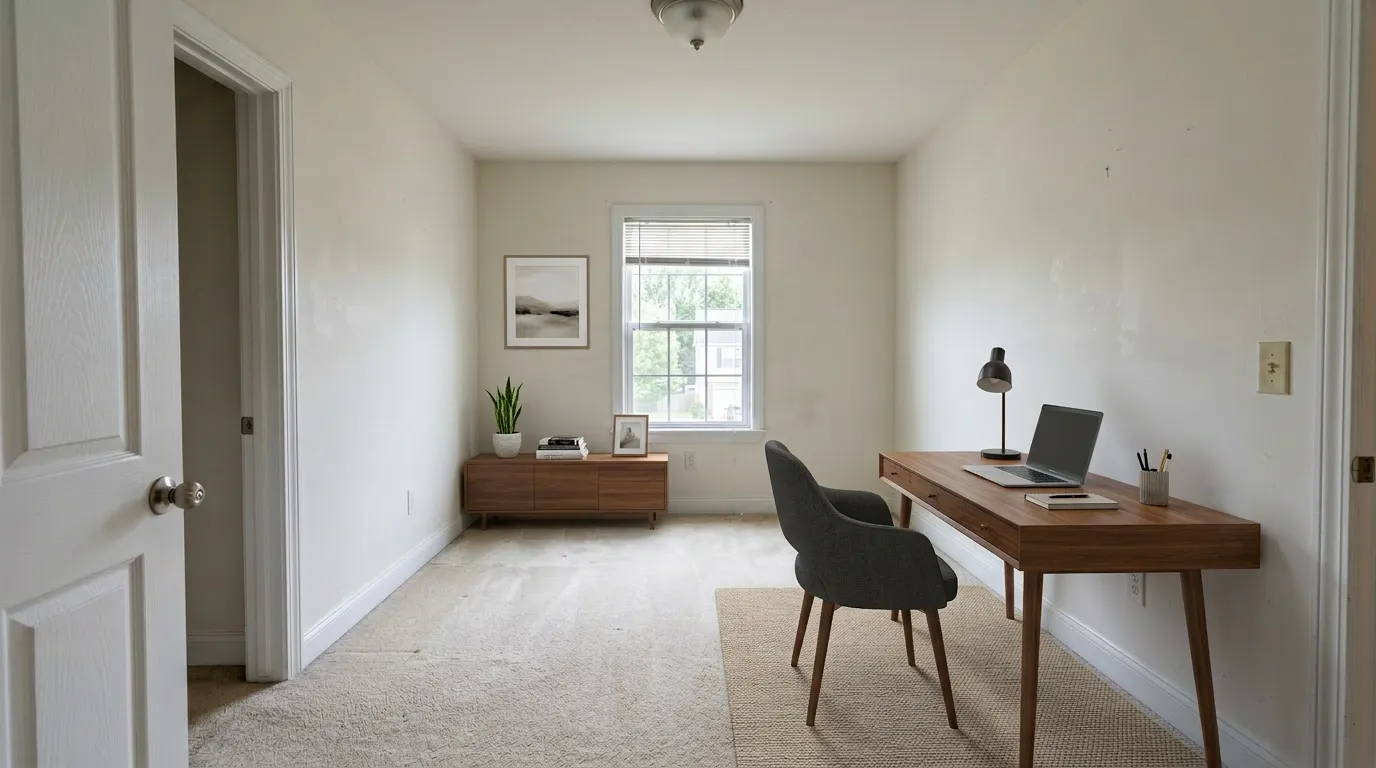
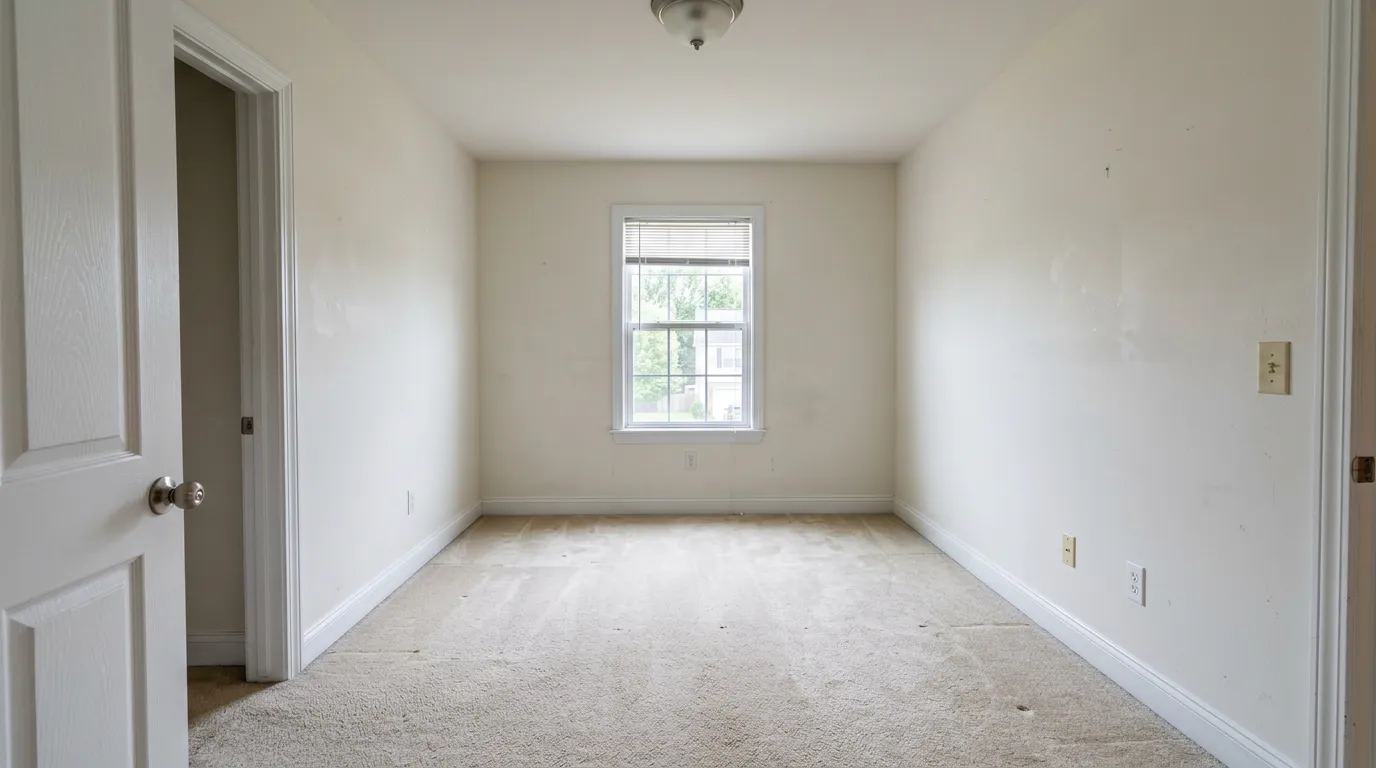
Top AI Virtual Staging Tools
VirtualStaging.tools
VirtualStaging.tools is an AI-powered staging platform built specifically for real estate agents. Upload an empty room photo, choose a room type and design style, and typically receive a staged image to review in about 30 seconds; complex rooms or queue conditions can take longer.
Key features:
- Built-in MLS Disclosure Helper — one-click AB 723-compliant paired export with the "Virtually Staged" watermark and remarks language ready to paste. Included on every plan, including Free.
- Commercial license on the Free tier — most competitors (VSAI, Collov, REimagineHome) reserve commercial rights for paid plans
- Results typically ready to review in about 30 seconds; complex rooms or queue conditions can take longer
- 2K resolution output on every plan, including Free; paid plans remove the watermark
- Free: 3 photos total (lifetime, watermarked, no credit card)
- Subscription plans: Standard is $25/month or $156/year for 36 credits released monthly; the annual option works out to $0.36/photo when all 36 monthly credits are used. Professional is $65/month or $468/year for 108 credits released monthly, or $0.36/photo on annual billing with full monthly use.
- Instant regenerations that don't re-charge the same photo — up to 3 total versions per photo on Free, 15 on paid
Best for: Individual agents and small teams who need fast staging + one-click MLS disclosure. The free tier's commercial license makes it usable for real listings (within the 3-photo lifetime cap). See the full pricing breakdown.
Limitations: Staging-only — no floor plans, photo retouching, or day-to-dusk services. If you need those, see our comparison with Box Brownie for a one-stop human-service alternative.
Virtual Staging AI (VSAI)
Virtual Staging AI is a dedicated AI staging platform and one of the category's largest brands, with Harvard Innovation Lab provenance.
Key features:
- AI virtual staging for empty rooms; occupied-room support in later tiers
- Multiple room types and styles
- 1-image preview without signup
- Pricing (source): Basic $16/mo = 6 photos = $2.67/photo — entry-tier per-photo cost is notably high for AI
Best for: Evaluators who want a no-friction single-photo preview before any signup. The 1-image gate is genuinely useful for a quick quality check.
Limitations: The VSAI Trustpilot feed shows a persistent pattern of 1-star complaints about annual auto-renewal following what users describe as a trial or monthly signup — 12+ such reviews in the 12 months ending April 2026 ("I didn't see the extremely small print at the very bottom saying 'yearly billing'"). Before entering a card, open the cancellation flow and read the confirmation screen carefully.
Considering Virtual Staging AI specifically? See our full Virtual Staging AI review and alternative — real pricing, the auto-renewal caveat, and how to cancel, all in one place.
Collov AI
Collov is an AI-first staging platform with a broad feature suite and one of the lowest per-photo prices among pure-AI tools.
Key features:
- Pricing (source, 2026-04-23): Standard $19/mo = 60 credits = $0.32/photo; Advanced $49/mo = 150 credits; Premium $79/mo = 263 credits
- 10-second turnaround claim
- Commercial photo license included on all paid tiers
- Yearly billing: 25% discount
- No free tier
Best for: Volume users who've already evaluated AI staging quality elsewhere and want the lowest per-photo cost among full-feature AI platforms.
Limitations: No free-tier evaluation — you pay before you test. Monthly credits don't roll over.
REimagineHome
REimagineHome specializes in AI-powered room redesign (restyling furnished rooms) in addition to empty-room virtual staging. Notable for a public CRMLS partnership.
Key features:
- Redesign for furnished rooms + staging for empty ones
- Multiple design themes and before/after comparisons
- Limited free trial via signup
- CRMLS partnership (referenced in HousingWire's 2026 roundup)
Best for: Agents who regularly list dated-decor or occupied properties and want to show alternative design directions on already-furnished spaces.
Limitations: Redesigning furnished rooms introduces more variability in output quality since the AI has to reconcile existing furniture. Commercial license is reserved for paid plans. Pricing is not displayed on a single static table — verify during signup.
Apply Design
Apply Design is a coin-based platform that combines AI auto-staging with a DIY drag-and-drop furniture editor — the most hybrid of the AI tools in our roster.
Key features:
- Pricing (source, 2026-04-23): credit system ("Apply Coins"), $7/coin at 20+ bulk, $10/coin at 1-9 scale
- AI auto-staging: 1.5 coins per 2D image = ~$10.50 at bulk rate
- DIY editor: 1 coin per 2D image; full control over furniture placement
- 15-minute turnaround claim for AI staging
- First image free; 100% money-back guarantee
- 18,000+ furniture pieces in DIY editor
Best for: Agents or photographers who want explicit control when the AI doesn't nail a specific room — the DIY editor lets you manually place furniture when needed.
Limitations: Highest per-photo cost in our roster. The hybrid UI is more complex than pure AI tools — expect a learning curve for the DIY editor.
Stagently
Stagently positions as a budget / volume AI tool with a genuinely recurring free tier.
Key features:
- Pricing (source, 2026-04-23): Starter $29/mo = 100 images = $0.29/img; Professional $79/mo = 400 images = $0.20/img; Business $199/mo = 1,000 images = $0.20/img
- Free: 5 credits per month, recurring (not lifetime), no credit card
- Claims "Trusted by 500+ real estate teams and brokerages"
- Additional credit packs from $22 (25 images) up
Best for: Price-sensitive high-volume users who can commit to a month's flow. The recurring 5/month free credits are useful for occasional use without a paid plan.
Limitations: Newer brand with less independent review data than VSAI or Collov. Verify output quality on your own photos during the free-credit window before upgrading.
Hybrid option (not covered in depth)
If you're open to a mix of AI and human designers, Styldod (bulk $16/img at 8+, hybrid AI+human, strong AB 723 enterprise positioning) is worth evaluating. It's closer in category to Box Brownie than to the pure-AI tools above. See our best virtual staging software guide for a full-landscape comparison including hybrid and human-designer options.
Comparison Table
Pricing fetched from each vendor's official pricing page on 2026-04-23. Subscription per-photo costs assume the listed allowance is fully used; annual rates are identified in the plan column.
| Tool | Per-photo at entry tier | Entry plan | Free tier | Speed claim | MLS Disclosure helper |
|---|---|---|---|---|---|
| VirtualStaging.tools | $0.36 with annual billing and full monthly use | $156/year; 36 credits released monthly, no rollover | 3 photos lifetime, commercial license, no card | Measured < 30s | Built-in AB 723 paired export |
| Virtual Staging AI | $2.67 | $16/mo Basic = 6 photos | 1-image preview, no signup | "A minute" | Not published; see billing caveat |
| Collov AI | $0.32 | $19/mo Standard = 60 credits | None | 10s claim | Not published |
| REimagineHome | Varies | Paid plans only | Limited trial | Varies | Not published; CRMLS partnership |
| Apply Design | $10.50 (AI auto) / $7 (DIY) | Coin-based, $7/coin at 20+ bulk | 1 image free | 15 min claim | Not published; 100% money-back |
| Stagently | $0.29 ($0.20 at Pro) | $29/mo Starter = 100 images | 5 credits/month recurring | Fast (unspecified) | Not published |
Key Features to Look For
Not all AI staging tools are created equal. Here is what to evaluate when choosing a platform:
Output Quality
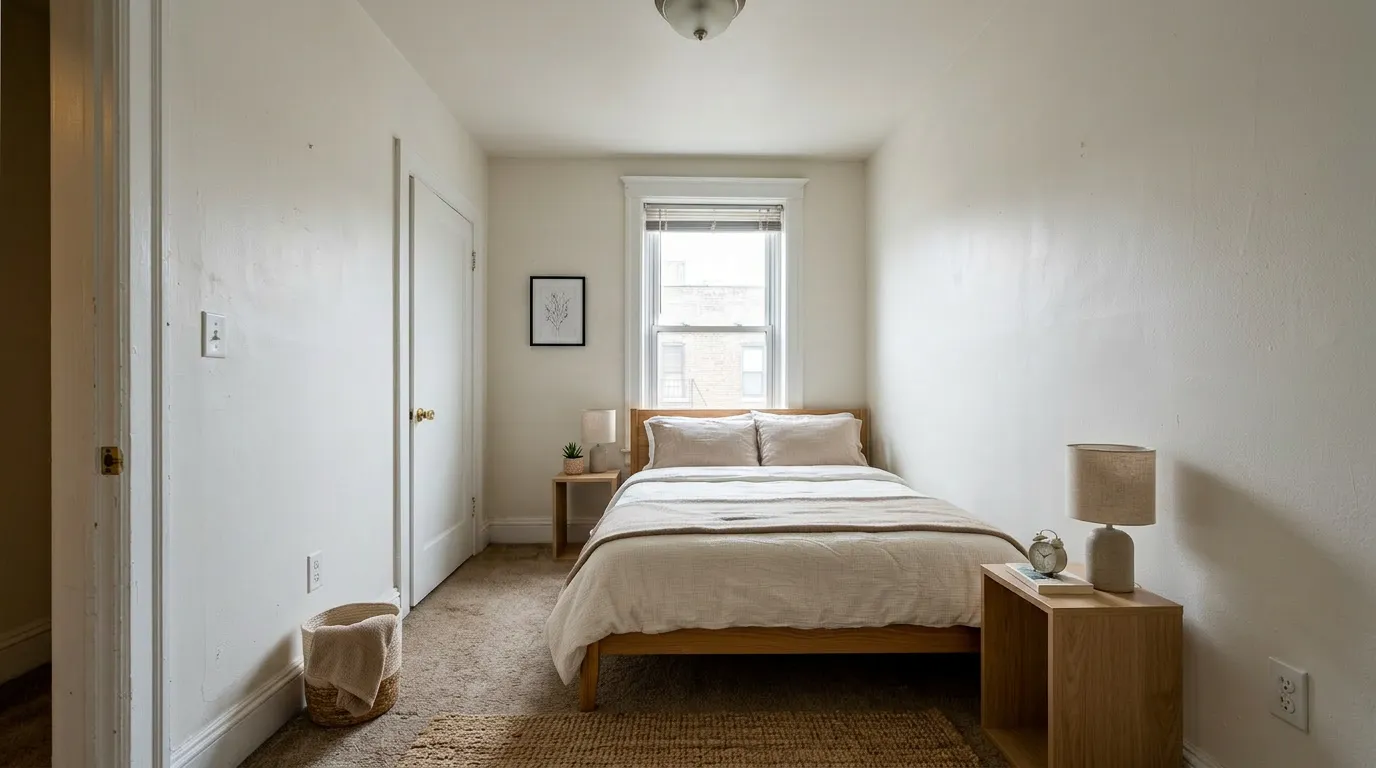
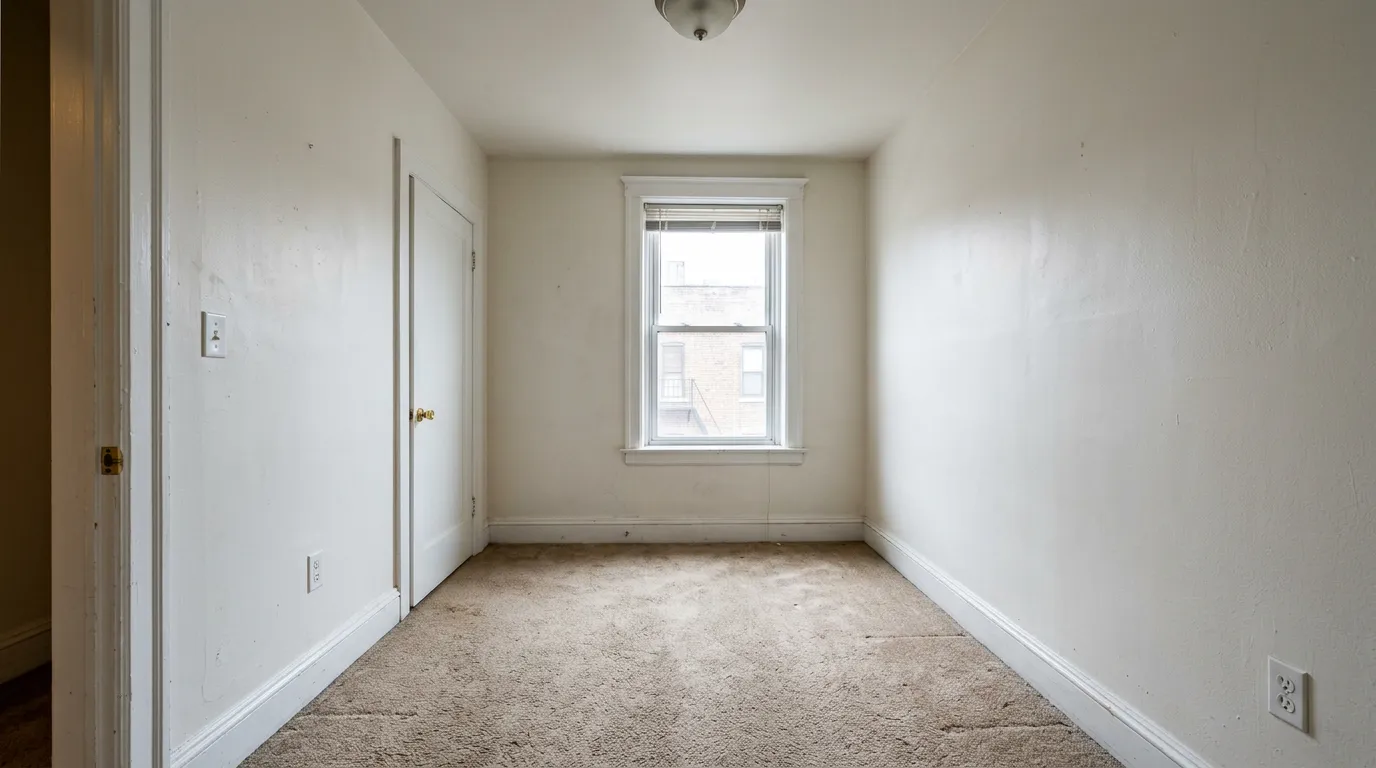
This is non-negotiable. Staged photos need to look realistic enough for MLS listings and marketing materials. Use the same three-step audit we recommend in our complete virtual staging guide:
- Contact shadows — do chair legs, bed legs, sofa feet cast realistic shadows where they meet the floor? Floating furniture is the #1 tell of weak AI.
- Scale — is the bed the right size for the room? Compare furniture against fixed references (windows, door frames, baseboards).
- Surface texture — do rugs read as fabric, or as printed-on stickers? Do cushions read as cushions?
Run this audit on the free-tier output of every tool you're seriously evaluating. Pure-AI platforms (us, Collov, Stagently, VSAI) can fail all three in the same image on an unusual room; that's a signal to move on, not to settle.
Speed
Most AI staging tools deliver results in under a few minutes, but the range matters. Some tools return images in under 30 seconds, while others may take several minutes. If you are staging photos during a client meeting or before an open house, every second counts.
Pricing Structure
Pricing models vary significantly:
- Per-photo pricing: Simple but expensive at volume
- Subscription plans: Monthly or annual plans with photo credits -- usually the best value for regular users
- Free tiers: Some platforms offer a handful of free photos so you can test quality before paying
Calculate your expected monthly volume and compare the effective per-photo cost across platforms. An agent staging 20-30 photos per month will see dramatically different costs depending on the pricing model.
Style Variety
Different listings call for different aesthetics. A modern condo needs a different look than a traditional family home. Check that your chosen platform offers styles that match the properties you typically sell:
- Modern / contemporary
- Traditional / classic
- Minimalist
- Scandinavian
- Farmhouse / rustic
- Coastal
Ease of Use
The best staging tool is the one you actually use consistently. Look for a clean, intuitive interface where you can go from upload to finished image in just a few clicks. Complex interfaces with too many options can slow you down without improving results.
MLS Compliance (AB 723 and beyond)
Staged photos used in MLS listings must be disclosed as virtually staged per NAR and nearly every local MLS rule. In 2026 this standard tightened sharply:
- California AB 723 (effective January 1, 2026) requires any digitally altered listing image to carry a conspicuous disclosure and make the unaltered original accessible — most California MLSes (CRMLS, SDMLS, Bay East) require the original placed immediately before or after the altered image in the listing view.
- New York, Massachusetts, and Florida have similar bills in committee. Expect paired-image rules to spread by 2027.
Evaluating tools on compliance: look for whether the tool exports a paired original alongside the staged image in a single click, and whether it generates the compliant remarks text. Most AI tools today deliver only the staged image — you build the disclosure layer yourself in Photoshop, a ~1 hour tax per 20-photo listing. VirtualStaging.tools ships this as the MLS Disclosure Helper on every plan.
See our complete virtual staging guide for the full AB 723 breakdown and state-specific details.
AI vs Traditional Virtual Staging
AI and traditional (human-designer) staging are not in direct competition for every use case. Here is when each approach makes the most sense:
Choose AI Staging When:
- You need results immediately -- same-day or same-hour
- You are staging multiple listings per month and need to control costs
- You want to test different styles quickly to see what resonates with buyers
- You are working with standard residential rooms (living rooms, bedrooms, kitchens)
- You want to try before you buy with a free tier
- You are an individual agent without a dedicated marketing budget for staging
Choose Traditional Staging When:
- You are marketing a luxury property where every detail needs to be perfect
- The room has unusual architecture or non-standard layouts that may confuse AI models
- You need specific furniture placement or custom design direction
- You also need additional editing services like photo retouching, day-to-dusk conversion, or CGI renders
- Time is not a critical factor and you can plan 24-48 hours ahead
The Hybrid Approach
Many successful agents use both approaches. They rely on AI staging for the majority of their listings -- capturing the speed and cost benefits -- and reserve traditional staging services for premium properties or challenging spaces that benefit from human creativity. This is a practical, cost-effective strategy that gets the best of both worlds.
Frequently Asked Questions
Which AI virtual staging tool offers the best free tier?
Depends on what you mean by "best." For recurring monthly free credits, Stagently's 5/month is the most generous in the AI pack (no credit card, resets monthly). For no-friction single-photo evaluation, Virtual Staging AI's 1-image preview doesn't require signup. For a lifetime free tier that is usable for real listings (commercial license included), VirtualStaging.tools gives you 3 photos lifetime — watermarked, but with full commercial rights. Different use cases, different answers.
Is AI virtual staging MLS-compliant? What changed with California AB 723?
AI virtual staging is legal in every US state as long as you disclose it per NAR and your local MLS rules. California's AB 723 (effective January 1, 2026) tightened the standard: any digitally altered listing image now requires a conspicuous disclosure plus an accessible unaltered original. Most California MLSes went further and require paired-image placement in the listing view itself. See our complete virtual staging guide for the full breakdown.
Which AI tool is cheapest at volume?
At 100+ photos per month, Stagently Professional ($79/mo = 400 images = $0.20/photo) is the lowest published per-photo cost in our roster. Collov Advanced ($49/mo = 150 credits = $0.33/photo) is next. Our Professional plan is $65/month or $468/year for 108 credits released monthly; the annual option is $0.36/photo when all 108 monthly credits are used. Professional also includes the MLS Disclosure Helper and commercial license on every credit. The "cheapest per photo" answer only matters if you'll actually use the included volume.
Can AI virtual staging handle occupied rooms?
Most 2026 AI tools (ours included) can remove existing furniture and re-stage in the same generation. Some platforms charge a separate fee for item removal — verify before you subscribe that de-clutter is included in your plan's credits, not an add-on. See our occupied rooms walkthrough for use cases and pitfalls.
What about ChatGPT or Gemini as a free alternative?
The underlying diffusion models are capable, and for a one-off listing image ChatGPT Plus or Gemini Advanced at $20/month can produce something a casual buyer wouldn't flag. What general AI lacks for production real estate use: structure preservation (it will move your windows), MLS disclosure export, multi-angle consistency across multiple photos of the same room, and a style library tuned for listing photos rather than magazine covers. For one listing a month with a careful operator, ChatGPT works; for five listings a month under deadline, a dedicated tool earns its subscription. See the ChatGPT or Gemini question for full detail.
Conclusion
The AI virtual staging market has matured to the point where most agents can get listing images to review far faster and more cheaply than manual staging. The tools reviewed here each have their strengths, but no generated image comes with universal MLS approval: compare it with the original and apply the disclosure rules that govern the listing.
When choosing a platform, prioritize output quality above all else -- test with your own photos, not just the samples on marketing pages. After quality, look at pricing relative to your volume, speed of delivery, and the range of styles available.
If you are exploring AI staging for the first time, start with a platform that offers a free tier so you can evaluate quality risk-free. VirtualStaging.tools gives you 3 free photos with no credit card required -- enough to test across different room types and see how the output holds up for your listings. From there, you can make an informed decision about which tool fits your workflow and budget.
The technology is only getting better. Agents who adopt AI staging now are building a real advantage in listing speed and marketing cost efficiency -- and that advantage compounds with every listing.
More from the blog
Related reading
10 Best Real Estate Photo Editing Tools & Services (2026)
Compare 10 real estate photo editing tools and services by pricing, turnaround, editing type, revisions, and best fit for agents and photographers.

10 Best Virtual Staging Companies in 2026
Compare 10 virtual staging companies by pricing, turnaround, service model, revisions, and best fit for agents, photographers, and real estate teams.

Box Brownie vs VirtualStaging.tools: Honest Comparison (2026)
Comparing Box Brownie and VirtualStaging.tools for virtual staging. See pricing, turnaround, quality, and features side by side to pick the right tool.