"Real estate photo editing" describes two different jobs:
- Improving the photo you captured: HDR merging, exposure and color correction, window pulls, perspective correction, sharpening, and delivery of a consistent full gallery.
- Changing what appears in a finished listing photo: virtual staging, furniture removal, decluttering, day-to-dusk conversion, or a renovation concept.
The first job is usually handled by photographers, batch-editing software, or an outsourced editor. The second is often ordered by an agent or listing marketer after the main shoot is already finished. A product can be excellent at one job and unsuitable for the other.
This guide compares 10 real estate photo editing tools and services by editing scope, delivery model, published pricing, turnaround, revisions or quality control, and best-fit user.
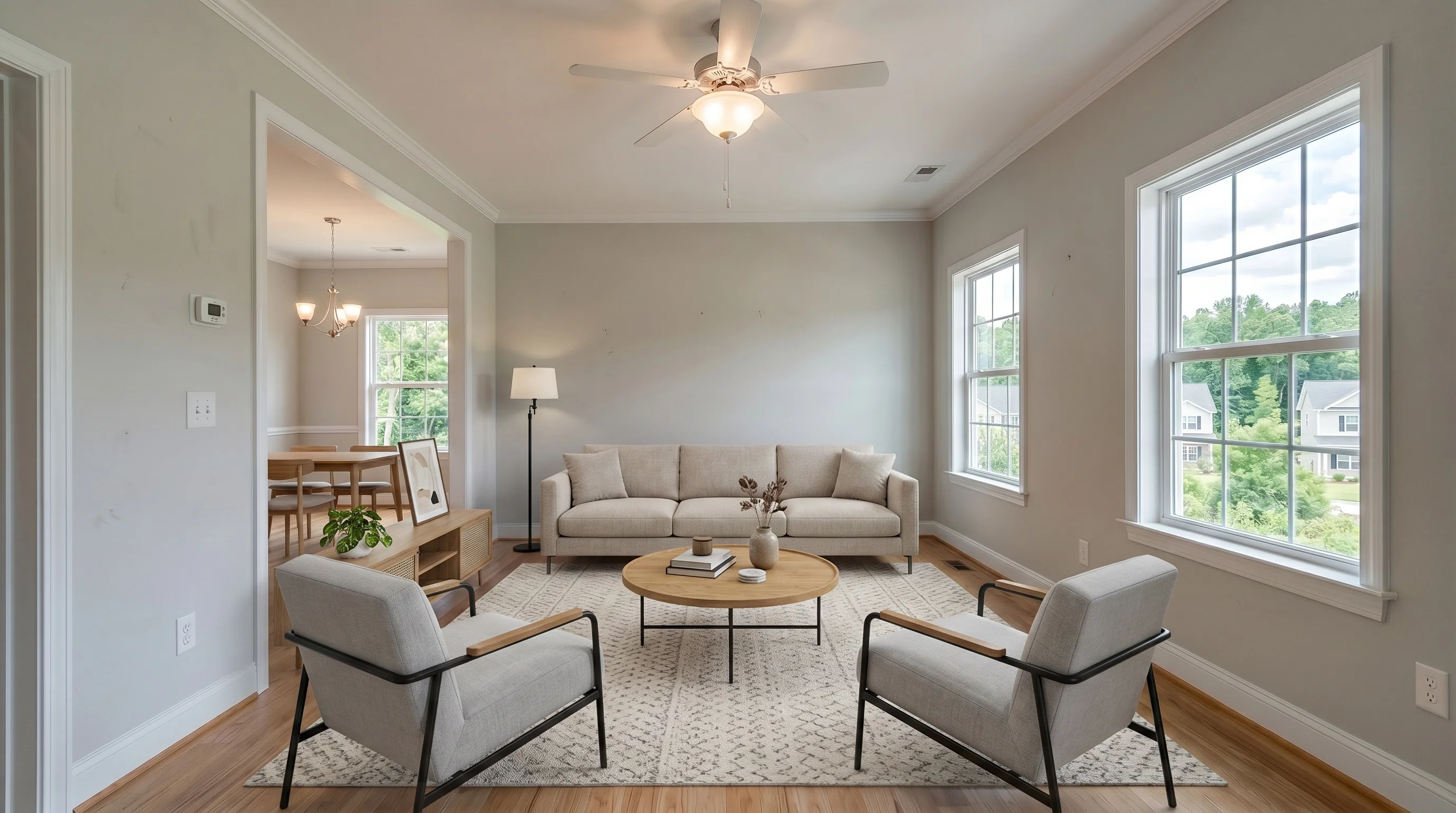 BeforeAfter
Disclosure and methodology: VirtualStaging.tools is our product and appears below. We have not completed a controlled same-photo test across all 10 providers for this edition, so this is not an experimental image-quality ranking. Best-fit labels are based on current official pricing, documented features, delivery model, revision policy, and workflow. Product details were checked against provider websites on August 3, 2026. Written and reviewed by Evan Ye, founder of VirtualStaging.tools.
Quick answer: match the editor to the job
| What you need | Start with this category | Options to shortlist |
|---|---|---|
| Edit an entire shoot: HDR, color, windows, perspective | AI batch editor | Imagen, AutoHDR, Fotello, Esoft Autopix |
| Send a finished shoot to a person | Human editing service or marketplace | PhotoUp, BoxBrownie, PixlMob |
| Stage, empty, declutter, or relight selected listing photos | Listing-content editor | VirtualStaging.tools, Nodalview |
| Retain complete manual control | Desktop editing software | Adobe Lightroom |
There is no useful overall winner across these categories. A photographer processing 500 RAW files and an agent staging three vacant rooms are buying different products.
How we compared the options
We used six buyer-facing criteria:
- Editing scope: full-shoot photo enhancement, listing-content edits, or both.
- Delivery model: self-service AI, AI with human quality control, outsourced human service, marketplace, or DIY software.
- Published cost: subscription, per-photo, per-listing, credit, or quote-based pricing.
- Turnaround: seconds, minutes, or a stated service deadline.
- Revision and quality-control workflow: self-service reruns, human revisions, editor selection, or manual control.
- Best fit and limitation: who is most likely to benefit, and what the product does not replace.
We did not assign output-quality scores without a controlled test. Vendor claims are described as published claims, not independently verified performance.
Comparison table
| Option | Model | Published pricing | Published turnaround | Revision or QC model | Best fit | Main limitation |
|---|---|---|---|---|---|---|
| Imagen for Real Estate | Browser-based AI batch editor + human revision | $0.32/photo pay as you go; custom volume pricing | First batch under 10 min | In-app adjustment and human revision | High-volume photography teams | Pricing and access vary by workflow and volume |
| AutoHDR | AI batch editor | Free 10 photos/mo; $265/mo for 500; $2,250/mo for 5,000 | Minutes; automation page describes delivery in about 15 min | AI re-edit and post-processing tools | Photographers prioritizing automation and scale | Monthly volume commitment for lower unit cost |
| Fotello | AI editing platform with in-house editor support | Free watermarked tier; from $16/listing at 75 listings/mo; pay-as-you-go usage listed separately | AI results in minutes; human revisions within 6 hr | Human checking and unlimited human revisions advertised | Real estate media companies wanting editing, delivery, and client workflow | Lowest per-listing pricing assumes substantial monthly volume |
| Esoft Autopix | AI service and API for media businesses | Quote-based, postpaid | About 40 min advertised | Sales-led support and enterprise workflow | Large media businesses needing API or managed scale | No public standard price |
| PhotoUp | Distributed human editing + AI services | $1.50/credit on demand; plans from $39/mo; photo editing from 1 credit | 24 hr standard delivery | Unlimited revisions advertised | Photographers wanting one managed service ecosystem | Credit math varies by shooting and editing style |
| BoxBrownie | Human-edited, à-la-carte service | $1.60 enhancement; $24 staging; $4 dusk; $4–$8 removal | 24 hr; 48 hr for staging | Unlimited changes advertised | Occasional orders with no subscription | Slower and more expensive than self-service AI for repeat content edits |
| PixlMob | Marketplace of independent editors | Editor-set; current profiles show roughly $0.39–$0.65 single exposure and $0.59–$0.95 HDR examples | Common profile promises range from 12–24 hr | Choose and review an individual editor | Photographers wanting a specific long-term editor | Price, capacity, style, and quality vary by provider |
| VirtualStaging.tools | Self-service AI listing-content editor | $25/mo for 36 photos; $13/mo billed yearly; 3 lifetime watermarked previews | About 30 sec | In-app regeneration and original/result comparison | Agents, photographers, and small teams needing staging, removal, twilight, or renovation concepts | Does not merge brackets or batch-correct an entire shoot |
| Nodalview | Listing-media platform with AI photo editor | Subscription quote; HDR 1 credit/photo; AI edits 1–3 credits; 14-day trial | AI edits described as instant or a few seconds | Self-service AI tools; optional human Premium Edits | Agencies wanting capture, tours, floor plans, and edits in one platform | Quote-based subscription plus two credit systems |
| Adobe Lightroom | DIY desktop, web, and mobile software | Live US page shows $11.99/mo; Adobe's June 2026 FAQ says new or renewing 1TB plans move to $14.99/mo | Your editing time | Complete manual control | Photographers who need precise creative control | Requires skill and time; no one-click virtual staging workflow |
Prices are public starting points in USD unless another currency is shown. Providers may use regional pricing, volume commitments, promotional rates, or custom agreements. Verify the checkout or proposal before purchasing.
AI batch editors for full real estate shoots
Imagen for Real Estate
Imagen for Real Estate is designed for browser-based batch processing rather than one-off staging. Its documented workflow includes HDR merge, window pull, perspective correction, sky replacement, color enhancement, RAW and JPEG input, and up to 6K output. Imagen says a first batch is processed in under 10 minutes and offers a 250-photo trial.
Its current support documentation lists pay-as-you-go pricing at $0.32 per photo, with custom pricing for teams processing larger annual volumes. The product also includes in-app changes and a human-revision path when an automated edit still needs attention.
- Best fit: real estate photography teams that need consistent galleries from multiple photographers.
- Consider it when: the main problem is batch throughput, not adding furniture to a few finished photos.
- Check before buying: whether your preferred style, file volume, and human-revision allowance are included in the specific plan offered to your account.
AutoHDR
AutoHDR combines automatic HDR and gallery editing with post-processing tools such as virtual twilight, removals, sky replacement, grass greening, TV blackout, and virtual staging.
The current pricing page shows:
-
Free: 10 photos per month.
-
Standard example: $265 per month for 500 photos, or $0.53 per photo.
-
Enterprise example: $2,250 per month for 5,000 photos, or $0.45 per photo.
-
Unused credits are advertised as rolling over.
-
Best fit: photographers and media companies that want automated editing connected to an existing delivery workflow.
-
Consider it when: predictable monthly volume makes a subscription economical.
-
Check before buying: first-pass consistency across one complete property, not only isolated demo images. Review any generative removal, staging, or twilight result against the original before delivery.
Fotello
Fotello combines real estate photo editing with booking, branded delivery, property websites, payments, and agent revisions. Its photo workflow supports RAW and JPEG inputs, window pulls, sky replacement, color and perspective correction, and multiple delivery resolutions.
Published pricing currently includes:
- Free: editing of up to 30 photos per listing with branded or view-only AI output.
- Essential: $16 per listing when billed around a 75-listing monthly commitment.
- Ultimate: $18 per listing at the same published volume, adding included twilight and staging usage.
- Pay-as-you-go usage is listed separately at higher per-listing amounts.
Fotello advertises in-house editor checking and unlimited human revisions, with revisions returned within about six hours.
- Best fit: established real estate media companies that want post-production and client delivery in one system.
- Consider it when: human correction and workflow consolidation matter more than the lowest entry price.
- Check before buying: the minimum monthly listing commitment and what happens during a slow season.
Esoft Autopix
Esoft Autopix is positioned as an AI editing service for real estate media businesses rather than a self-serve consumer editor. It advertises postpaid billing, roughly 40-minute turnaround, delivery through Esoft's Coconut platform, partner platforms, or API, and 24/6 support.
The public product page does not provide a standard price. Esoft asks prospective customers to request testing or speak with its team.
- Best fit: large photography businesses that need API access, managed onboarding, and enterprise support.
- Consider it when: scale and integration are more important than instant self-serve signup.
- Check before buying: minimum volume, exact unit price, revision terms, service-level commitments, and data-retention terms in the proposal.
Human editing services and marketplaces
PhotoUp
PhotoUp offers distributed photo editing, dedicated editors, AI virtual staging, floor plans, property sites, and other media services.
Its current public pricing shows:
-
On demand: $1.50 per credit and five free starting credits.
-
Plans: from $39 per month for 50 credits.
-
Single-shot editing: from 1 credit.
-
HDR: 1.25 credits.
-
Flambient: 1.5 credits.
-
AI virtual staging: 3 credits, with three furniture options and a documented revision window.
-
Standard delivery: 24 hours.
-
Revisions: unlimited revisions advertised for standard photo editing.
-
Best fit: photographers who want one managed vendor for editing plus adjacent listing-media work.
-
Consider it when: human support and an established outsourcing workflow justify a longer turnaround.
-
Check before buying: the credit cost of your exact shooting style and any premium add-ons.
BoxBrownie
BoxBrownie remains one of the clearest à-la-carte choices:
-
Image enhancement: $1.60 per image.
-
Virtual staging: $24 per image.
-
Day to dusk: $4 per image.
-
Item removal and virtual cleaning: $4–$8 per image.
-
Published turnaround: 24 hours, or 48 hours for virtual staging.
-
No subscription, with unlimited changes advertised.
-
The free trial advertises three image enhancements and one dusk conversion.
-
Best fit: agents or photographers placing occasional orders without committing to software.
-
Consider it when: you prefer briefing a service instead of reviewing AI generations yourself.
-
Check before buying: regional pricing and whether the job is standard enough for the published price rather than a custom quote.
For staging-specific alternatives, see our virtual staging company comparison.
PixlMob
PixlMob is a marketplace rather than one editing team. Each editor publishes a portfolio, services, prices, capacity, ratings, and turnaround.
Current public profile examples show:
- Single-exposure edits around $0.39–$0.65 per photo.
- Blended HDR examples around $0.59–$0.95 per final photo.
- Common advertised turnaround windows of 12–24 hours.
Those examples are not marketplace-wide guarantees; the editor you choose determines the actual result and terms.
- Best fit: photographers who want to select and keep working with a specific editor.
- Consider it when: portfolio fit and direct editor choice matter more than uniform platform output.
- Check before buying: a paid sample property, recent reviews, daily capacity, revision terms, and backup coverage when the editor is unavailable.
Listing-content editors for selected photos
VirtualStaging.tools
VirtualStaging.tools is built for changes to selected finished listing photos: virtual staging, furniture removal, virtual twilight, and virtual renovation concepts. It is not a RAW processor or HDR-merging service.
Published pricing currently includes:
- Standard monthly: $25 for 36 photos, about $0.69 per included photo if fully used.
- Standard annual: $13 per month billed yearly for the same monthly allowance, about $0.36 per included photo if fully used.
- Free: three lifetime watermarked previews.
- Typical generation time is about 30 seconds.
The staging workflow is designed to preserve walls, windows, doors, flooring, and fixed features. Because every result is AI-generated, compare it with the original before publishing; structure-preserving settings reduce risk but are not a guarantee that no pixel will change.
- Best fit: agents, listing marketers, photographers, and small teams that need a few content-level edits after the base photo is ready.
- Consider it when: same-day self-service is more important than human art direction.
- Choose another category when: you need HDR merging, RAW development, bulk color correction, or a designer to execute a highly specific furniture brief.
Photographers can see the intended combined workflow on our real estate photographer page.
Nodalview
Nodalview combines mobile capture, HDR photos, tours, floor plans, video, and an AI photo editor.
Its pricing is quote-based, with usage layered on top:
-
HDR photo: 1 credit.
-
AI edits: 1–3 credits.
-
Furnish Room: 3 AI credits.
-
Tidy or Empty Room: 2 AI credits.
-
Magic Eraser, sky replacement, and Magic Enhance are listed as included in the newer AI-credit system.
-
A 14-day platform trial is advertised.
-
Extra-credit bundles currently fall as low as €0.49–€0.60 per credit at the largest published sizes.
-
Best fit: agencies that want capture, property media, and selected AI edits inside one platform.
-
Consider it when: reducing the number of separate tools matters more than transparent self-serve pricing.
-
Check before buying: the base subscription quote, monthly AI-credit allowance, extra-credit expiration, and whether a specific edit is included or charged.
The DIY baseline
Adobe Lightroom
Adobe Lightroom remains the baseline for manual exposure, color, masks, perspective, lens corrections, presets, and gallery consistency.
Adobe's live US plan page currently displays $11.99 per month for an annual plan billed monthly. However, Adobe's June 2026 pricing FAQ says the Lightroom 1TB plan increases to $14.99 per month for new subscribers and renewing customers after March 20, 2026. Treat the checkout price for your account and region as authoritative.
- Best fit: photographers who need precise control and are willing to build a repeatable editing workflow.
- Consider it when: the edit itself is part of your professional craft rather than a task you want fully outsourced.
- Main limitation: your time. Lightroom is not a one-click virtual staging service, and generative content edits still require review and disclosure.
How to choose without paying for the wrong workflow
Choose a batch editor when
- You regularly process complete shoots rather than a few selected images.
- HDR brackets, window pulls, perspective, and gallery-level color consistency are the main work.
- Your volume is high enough to justify a monthly or per-listing commitment.
- You are willing to audit first-pass output before changing the whole production pipeline.
Choose a human service when
- You want someone else accountable for revisions.
- Your shoots include unusual blends, reflective rooms, complex masking, or bespoke requests.
- A 12–48 hour deadline is acceptable.
- You value a stable editor relationship more than instant processing.
Choose a listing-content editor when
- The base photo is already finished.
- The remaining task is staging, emptying, decluttering, twilight, or a renovation concept.
- Only a few hero or problem images need changes.
- You can compare the output against the original before publishing.
Keep Lightroom when
- Your editing style is a differentiator clients pay for.
- You need pixel-level control.
- Automation saves less time than it creates in review and correction.
- You already have presets, calibrated displays, and a fast manual workflow.
For many photographers, the practical answer is a two-tool workflow: one batch editor or human service for the full shoot, plus a listing-content tool for staging, removal, or twilight upsells.
A five-image test before committing
Do not judge an editor from its own demo gallery. Run the same small test through every serious finalist:
- One ordinary interior with neutral light.
- One difficult interior with bright windows and mixed color temperatures.
- One exterior with sky, landscaping, signage, and fine details.
- One occupied room that needs removal or decluttering.
- One vacant room that needs staging.
Track:
- Time from upload to usable delivery.
- First-pass usable rate.
- Total cost after reruns or revisions.
- Color consistency across the property.
- Changes to walls, windows, flooring, fixtures, signs, addresses, and views.
- Available output sizes and file formats.
- Ease of asking for and receiving a correction.
- Whether the original and disclosure text can be delivered with the edit.
A lower headline price loses its value if half the images require manual repair.
Disclosure and truthful listing photos
Editing rules depend on the edit, jurisdiction, MLS, portal, and brokerage policy.
NAR's national standard
NAR's 2026 Standard of Practice 12-10 requires REALTORS® to present a true picture and prohibits manipulating content in a way that creates a deceptive or misleading result, including misleading images. It does not prescribe one universal "virtually staged" caption format for every MLS.
California AB 723
California Business and Professions Code §10140.8 requires a reasonably conspicuous disclosure on or adjacent to a digitally altered image, plus a publicly accessible website, URL, or QR code that includes and clearly identifies the original image. On a website controlled by the broker or salesperson, the original must be included in the posting or made available through a compliant public link.
The law distinguishes common adjustments that do not change the property's representation—such as exposure, lighting, sharpening, white balance, color correction, straightening, angle, and cropping—from changes that add, remove, or alter property elements. Do not assume a sky replacement, removed object, changed landscape, staged room, or modified window view is a routine adjustment.
Local MLS rules can be stricter
CRMLS Rule 11.5.2 currently requires the original image to appear immediately before or after the digitally enhanced image in the MLS, even when the enhanced image is labeled. Other MLS organizations may use different fields, labels, or placement rules.
Keep originals, never remove defects or materially misrepresent the property, and verify the current rules with the relevant MLS and brokerage. This section is practical information, not legal advice. Our listing photo disclosure guide and text generator provides a workflow based on official sources.
Frequently asked questions
What is the best real estate photo editing software for photographers?
For complete shoots, start with the batch category rather than a virtual staging tool. Imagen and AutoHDR focus on automated full-gallery processing; Fotello combines AI editing with human revision and delivery tools; Lightroom provides the most manual control. The right choice depends on volume, shooting method, preferred style, revision tolerance, and how much of the workflow you want to automate.
Should I use photo editing software or an editing service?
Use software when speed, repeatability, and self-service control matter. Use a service when you want a human responsible for judgment-heavy work and revisions. A marketplace such as PixlMob sits between the two: you select an individual editor, but the platform handles ordering and reviews.
How much does real estate photo editing cost?
Current public examples range from about $0.32–$0.53 per photo for AI batch plans, around $1.50–$1.60 for basic on-demand human enhancement, and much more for content edits such as human virtual staging. Subscription and per-listing prices only reach their advertised unit cost when you use the included volume, so compare cost per usable delivered image rather than the headline rate.
Can an agent use AI to edit listing photos?
Yes, but the edit must remain truthful and follow the applicable disclosure rules. Routine correction and content-changing edits are not the same. Compare AI output with the original, keep the original file, disclose material alterations, and never remove defects or alter the property in a misleading way.
Does a virtually staged or decluttered photo need disclosure?
Often yes, but the exact requirement comes from state law, the local MLS, the portal, and brokerage policy. NAR requires a true picture and prohibits misleading images; it does not provide one universal label. California AB 723 requires a conspicuous disclosure and access to the original for covered digital alterations, while CRMLS also requires the original adjacent to the enhanced image in the listing.
Is one real estate photo editor enough?
Sometimes, but many photographers benefit from two layers: a batch tool or human editor for the base gallery, then a listing-content tool for selected staging, removal, twilight, or renovation requests. The two jobs use different inputs, quality checks, and pricing models.
Official sources and update policy
Provider details were checked on August 3, 2026 against the following official pages:
- Imagen for Real Estate and its real estate web-app pricing FAQ
- AutoHDR features and pricing
- Fotello pricing and photo editing features
- Esoft Autopix
- PhotoUp pricing and AI virtual staging documentation
- BoxBrownie pricing and services
- PixlMob editor marketplace
- VirtualStaging.tools pricing
- Nodalview pricing and AI credit documentation
- Adobe Lightroom plans and Adobe's June 2026 pricing FAQ
- NAR 2026 Code of Ethics
- California AB 723 / BPC §10140.8
- CRMLS digitally altered image guidance
Pricing and features change. We review this page periodically, but readers should confirm current checkout terms and local disclosure rules before making a purchase or publishing an altered listing image.
More from the blog
Related reading
Best AI Virtual Staging Tools Compared (2026)
Compare the top AI virtual staging tools for real estate. Side-by-side review of features, pricing, speed, and quality to help you pick the right platform.

Box Brownie vs VirtualStaging.tools: Honest Comparison (2026)
Comparing Box Brownie and VirtualStaging.tools for virtual staging. See pricing, turnaround, quality, and features side by side to pick the right tool.

10 Best Virtual Staging Companies in 2026
Compare 10 virtual staging companies by pricing, turnaround, service model, revisions, and best fit for agents, photographers, and real estate teams.