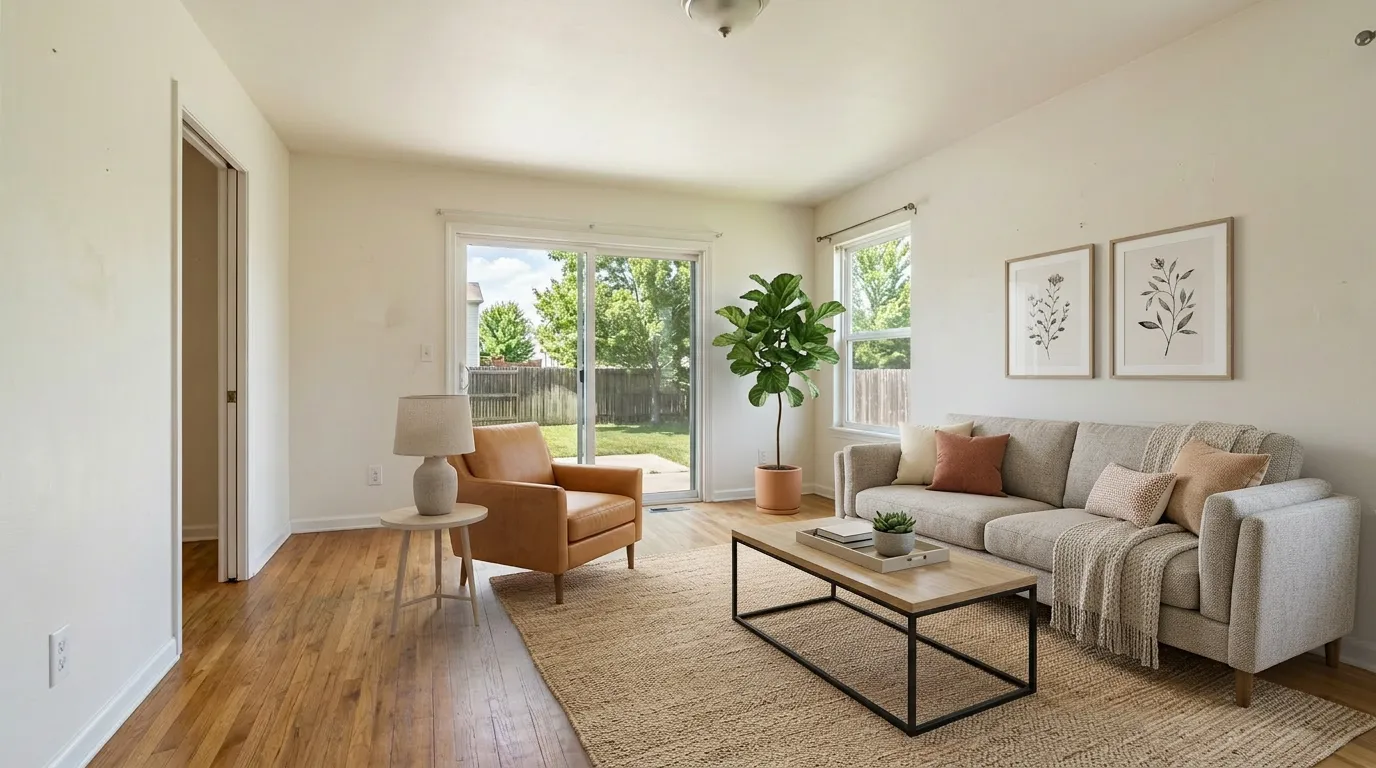
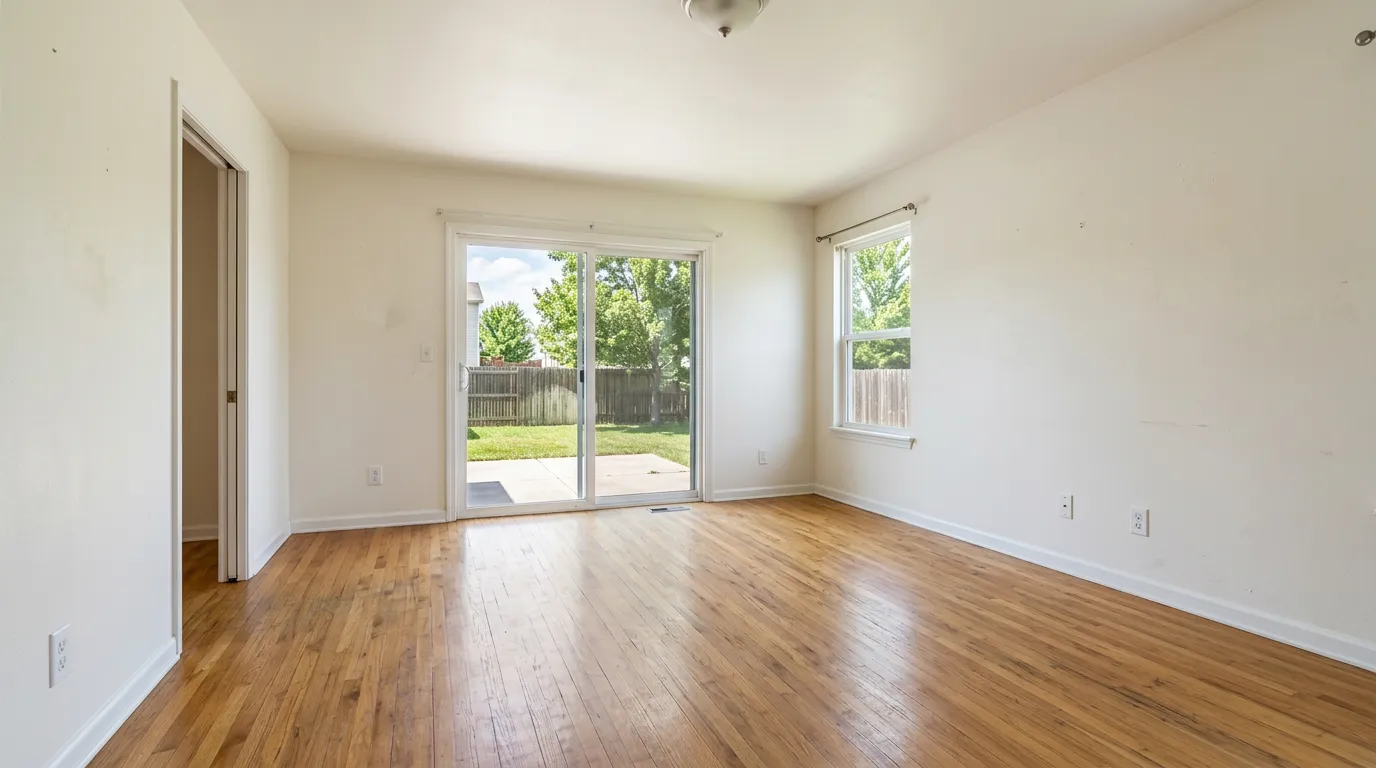
Free virtual staging sounds simple — until you read the fine print. In practice, the word "free" covers four very different things in this market: a time-limited trial, a recurring free tier, a watermarked preview, and DIY tools you operate yourself. Each is "free" in a different way, and most have a catch that matters once you try to put the photo on a real listing.
This guide cuts through the marketing for solo listing agents in 2026. We operate VirtualStaging.tools, so we have a clear bias — but the goal here is to help you decide whether free is enough for your listing flow, not to push you onto a paid plan. If you want the foundation first, see our complete virtual staging guide.
What "free" actually means in virtual staging
There are four buckets. Knowing which one you're in changes everything else.
1. Free trial. A short window — sometimes a single image, sometimes a few days of access — after which you either pay or lose access. Most "free" claims from major AI staging vendors fall here.
2. Recurring free tier. A real free plan that resets monthly (or once on signup, lifetime). Smaller market. Usually credit-capped, sometimes watermarked, often with restricted commercial rights.
3. Watermarked preview. You can generate as much as you want, but every output has an overlay or watermark you can't legally remove. Useful for client mockups and brainstorming, useless for MLS.
4. DIY tools. Photoshop, Affinity, free 3D room planners (Coohom, Planner 5D's free tier), or general-purpose AI like ChatGPT and Gemini. Truly free in software cost — but you're doing the work, not the AI. Time cost is real.
If you only remember one thing: "free trial" and "free tier" are not the same. A trial pays for itself only if you actually plan to subscribe. A free tier can be a permanent part of your workflow if you understand its limits.
The 6 things free tiers usually limit
Before judging any free option, check these six constraints. Most vendors hide at least one of them three clicks deep.
| Limit | What to look for | Why it matters |
|---|---|---|
| Commercial license | Can you legally use the output on a paid listing? | Most paid-only platforms reserve commercial rights for subscribers — free output is "personal use only" |
| Watermark | Visible logo, "Made with X" overlay, or low-resolution stamp | A watermarked photo can't go on MLS without disclosure issues |
| Resolution | 1024px? 2K? 4K? Are exports throttled below paid tiers? | MLS photo specs typically expect 2K+ |
| Speed / queue | Are free users deprioritized? Can a 30-second job take 10 minutes? | Matters if you're staging the morning of a showing |
| Regenerations | Can you re-roll a bad result for free? Or does each retry burn a credit? | AI staging is iterative — one shot is rarely the keeper |
| Layout integrity | Does the output keep walls, windows, doors, and floor unchanged? Or does the AI hallucinate new ones? | A photo where the AI altered the room's structure cannot legally be a "virtually staged" listing photo — it's a misrepresentation of the property itself |
A "free" plan that's missing commercial license is not free for a real estate agent. You can't legally use the photo on a listing.
A quick look at free tiers in 2026
The actual free landscape across the major AI virtual staging tools, based on each vendor's published pricing as of April 2026. For the full paid breakdown, see our AI virtual staging comparison.
| Tool | Free quota | Commercial | Watermark | Layout risk | Catch |
|---|---|---|---|---|---|
| VirtualStaging.tools | 3 lifetime, no card | ✅ Included | Yes (free) | Low | Lifetime cap; for ongoing use you upgrade |
| VSAI | Trial-style | Paid only | Yes on trial | Low | Auto-renewal complaints on Trustpilot — read the cancel screen first |
| Collov AI | None | N/A | N/A | Low | Pay before you test |
| REimagineHome | Limited trial | Trial only | Yes on trial | Medium | Trial scope not clearly published |
| Apply Design | 1 image | Trial only | Yes on trial | Low | One-shot; backed by money-back |
| Stagently | 5/mo recurring, no card | Paid only | Yes on free | Medium | Newer brand; verify quality during the credit window |
| ChatGPT / Gemini DIY | Plan-included | Varies by ToS | None | High without prompt locks | Geometry drift; prompt skill required |
The honest read for a solo agent: if you want to evaluate AI virtual staging without entering a card, the realistic options are VirtualStaging.tools (3 lifetime + commercial license), Stagently (5/month recurring), and Apply Design (1 image). The rest are trial-only and require a payment method up front.
Does the AI keep your room intact? The hallucination problem
Layout integrity is the failure mode most agents only discover after they've burned their free credits. The dedicated AI staging tools (us, VSAI, Collov, REimagineHome, ApplyDesign) are trained to add furniture without touching walls, windows, doors, or floor — but no model is perfect, and the general-purpose AI tools (ChatGPT, Gemini) are much worse at this without explicit prompt locks.
Common failures Reddit reports across free trials:
- New windows or doors that weren't in the original photo
- Walls that subtly shift position or change color
- Floor finish swapped (hardwood → tile, or vice versa)
- Furniture rendered at wrong scale — sofa floating, bed too small for the room
- Reflections or shadows pointing the wrong direction
Why this matters specifically for free output: a photo where the AI altered the room's actual structure cannot legally be a "virtually staged" listing photo. NAR's disclosure rules and California's AB 723 cover furniture and decor added to an empty room — those are virtual staging. Architectural changes are misrepresentations of the property itself, with potential liability that no disclosure caption fixes.
How to test before you commit: generate 2–3 versions of the same photo and compare side-by-side against the original. If walls, windows, doors, or floor differ across the outputs, the model is hallucinating — move to a tool with stronger layout locks. The dedicated AI staging tools generally win here. If you're DIY-ing with ChatGPT or Gemini, your prompt should explicitly say "do not change walls, windows, doors, or floor — only add furniture and decor."
What free virtual staging actually costs
"Free" is rarely the whole price. Here's the realistic 2026 cost landscape across the categories:
| Category | Per-photo cost | Notes |
|---|---|---|
| Recurring or lifetime free tier | $0 | 3–5 photos before quotas hit; usually watermarked |
| AI free trial | $0 for 1–N photos, then $1–$5 each or $15–50/mo | Credit card usually required up front |
| AI subscription, entry plan | $0.20–$0.36 | Roughly $13–29/mo annually for 36–100 credits |
| Per-photo AI (no subscription) | $1–$5 | Higher than subscription rate but no commitment |
| Human virtual staging (Box Brownie, Stuccco) | $25–$75 | 24–48 hour turnaround; designer hand-crafts each photo |
| DIY in Photoshop or Affinity | $0 software (if owned) + 30–90 min per photo | Affinity Photo: one-time ~$70; Adobe is subscription |
| DIY in ChatGPT / Gemini | Plan-included or free quota | Layout integrity risk; prompt skill required |
The numbers most agents miss: regeneration cost (re-rolling a bad output usually burns a credit, so a "5 free credits" plan is closer to 1–2 keepers), and time spent rotating across multiple free tiers to assemble enough photos for one listing. If you list more than once a month, the entry-tier subscription wins on hours alone — see our pricing page for the math at our entry plan.
Can you actually use a free virtual staging photo on a real listing?
This is the question that matters. Short answer: only if three things are true at once.
1. The free tier grants commercial use. Most free plans don't. If the terms of service say "personal use," "non-commercial," or "preview only," the photo can't legally go on MLS or paid listing platforms — even if the output looks identical to the paid version. Our free tier explicitly grants commercial rights; most competitors do not.
2. There's no watermark on the export. Some "free" tools watermark the corner. Even a small watermark on a listing photo looks unprofessional and can trigger MLS rejection on quality grounds. Confirm the export is clean before you commit.
3. You disclose the photo as virtually staged. This is true on free and paid plans. NAR's Code of Ethics requires disclosure of any "material alteration" of listing photography. California's AB 723 (in effect since July 2025) requires a clearly visible "Virtually Staged" caption on the image itself for MLS listings. Important execution detail: put the disclosure in both the MLS description and the public remarks — Zillow strips remarks-only disclosures from imported listings, so single-place disclosure can disappear downstream.
If all three check out, the photo is usable. If any one fails, you're either looking at a paid upgrade or a different tool.
Step-by-step: Stage one listing photo for free
If you're staging a single vacant room from scratch and want a usable result on the free quota, this is the sequence that works in 2026:
- Pick the right photo. Eye-level, well-lit (mid-day natural light wins), wide-angle but not fish-eye, room emptied or near-empty. AI staging fails on cluttered rooms, dark photos, and tight crops.
- Pick the right tool for your use case. One photo on a low-stakes mockup → ApplyDesign's 1-image free or ChatGPT/Gemini DIY. One MLS-ready photo with disclosure → our 3-lifetime free tier (commercial license included). Multiple photos across one listing → rotate Stagently (5/mo) plus our 3 lifetime to assemble ~8 photos before paying anything.
- Choose a style that matches the home. Mid-century modern in mid-century homes; coastal in coastal markets; contemporary as a safe default. Don't choose a style buyers won't expect to see in this neighborhood.
- Lock the layout if the tool allows it. Dedicated AI staging tools have this built into the model. For ChatGPT/Gemini, prompt explicitly: "Add furniture and decor to this empty room. Do not change the walls, windows, doors, floor, or ceiling. Keep the existing geometry exact."
- Review the output for hallucination. Compare against the original — walls, windows, doors, floor identical? Furniture scale realistic? Light direction consistent with the original photo? If anything's off, regenerate; if regenerations keep failing in the same way, the tool isn't right for this room.
- Add the disclosure caption and upload. Standard "Virtually Staged" overlay on the image; "Virtually staged" in the MLS description and in the remarks. Some MLSs additionally require uploading the unaltered original alongside the staged version — check yours before submitting.
Three photos at this discipline level beats thirty regenerated on a tool that hallucinates. Free quota is precious — spend it on the keeper, not the experiments.
How VirtualStaging.tools' free tier works
For full transparency: our free tier is 3 staged photos, lifetime, watermarked, no credit card required. The commercial license is included — meaning if you want to use one of those three on a real listing (with the standard "Virtually Staged" disclosure), you can.
What it's designed for: letting you test our quality on your own listing photos before deciding whether to subscribe. Three photos is enough to stage one room across three style variations, or three rooms in a single style — both are realistic evaluation flows.
What it's not designed for: replacing a subscription. If you list more than one property a quarter, three lifetime photos run out fast. The math on our entry plan ($13/mo annual, ~$0.36/photo) breaks even at one full listing per month versus paying per-photo elsewhere. See the full pricing breakdown.
We deliberately don't gate the free tier behind a card. The trade-off most competitors make — "free trial, but we charge you in 7 days unless you cancel" — is the pattern that drives the 1-star auto-renewal complaints we see across this category. Three lifetime photos with no card on file is harder to monetize, but it's an honest evaluation experience.
When the free tier is enough (and when you've outgrown it)
A practical heuristic for solo agents:
Free is genuinely enough if:
- You list 1–2 properties per year and only need staging on one or two rooms each
- You're using staging mostly for client conversations and not every MLS upload
- You can rotate across 2–3 free-tier tools (us + Stagently + Apply Design) to total ~10 photos per quarter
You've outgrown free when:
- You're listing once a month or more
- You need batch staging across a full vacant home (5+ rooms)
- You want unlimited regenerations to dial in style
- You need commercial-grade resolution (2K+) on every export
- You want the AB 723 disclosure helper, batch tools, or commercial license without ambiguity
The line where a $13/mo plan beats juggling free tiers is roughly one full listing per month. Below that, free can work. Above that, the time you save on one listing pays the annual subscription.
DIY routes when no AI tool fits
Sometimes the free AI tier doesn't get you what you need — unusual room layouts, awkward angles, or the AI keeps generating furniture in the wrong scale. The DIY routes are genuinely free, and worth knowing about.
Photoshop / Affinity Photo. The highest-quality option if you have the skill. Manual furniture compositing from stock libraries (or your own renders) gives you total control. Time cost: 30–90 minutes per photo for a non-expert; 10–20 for someone fluent. Affinity Photo is a one-time purchase, not free, but cheaper than many monthly subscriptions over a year.
ChatGPT, Gemini, and Nano Banana. Reddit's most-discussed DIY path in 2025–2026. You upload your empty-room photo to a general-purpose multimodal AI (ChatGPT image-to-image, Gemini, or Google's "Nano Banana" image model) and prompt it to add furniture without altering the room. Pros: free quota included with subscriptions you may already pay for; no per-photo charge. Cons: layout integrity is much worse than dedicated AI staging tools — without an explicit "do not change walls, windows, doors, or floor" prompt, these models freely invent windows, swap floor finishes, and miss scale. Commercial license depends on each vendor's ToS for AI-generated images on free vs paid plans — verify before MLS use. Best for prompt-comfortable agents who want a free way to evaluate before buying a dedicated tool.
Free 3D room planners (Coohom, Planner 5D, SketchUp Free). These let you build a furnished 3D model of the room and render it. Full creative control, but the output reads as "rendered" rather than "photographed" — fine for client conversations and floor-plan-driven mockups, less convincing for MLS hero photos.
Open-source AI staging. Self-hosted Stable Diffusion + ControlNet pipelines can produce high-quality staged outputs for free if you have the GPU and the patience. This is "free" only in a software sense — it costs your time and an RTX-class card.
For a fuller comparison of human-service alternatives like Box Brownie and Stuccco, see our best virtual staging software guide and the Box Brownie head-to-head.
Frequently Asked Questions
Can I try virtual staging AI for free?
Yes — at least three meaningful options exist in 2026: VirtualStaging.tools' 3-photo lifetime tier (with commercial license, no credit card), Stagently's 5 credits/month recurring tier, and ApplyDesign's single-image free trial. Most other vendors require a credit card for "free" access and auto-convert to paid plans.
Can I do virtual staging myself?
Yes, in two ways: with a dedicated AI staging tool's free tier (5–10 minutes per photo, no design skill needed), or as full DIY in Photoshop / Affinity Photo, or via ChatGPT or Gemini with image-to-image prompting. DIY in Photoshop takes 30–90 minutes per room for a non-expert; ChatGPT/Gemini is faster but with higher layout-integrity risk.
What is the best free virtual staging app?
For a solo agent who needs MLS-usable output, the strongest free tiers are VirtualStaging.tools (3 lifetime, commercial license, no card) and Stagently (5/month recurring). ApplyDesign's 1-image trial is useful for a one-off test. Choose based on volume: lifetime for evaluation, monthly recurring for ongoing low volume.
How much does virtual staging cost?
Free tiers exist (3–5 photos), AI subscription pricing runs $0.20–$0.36/photo at entry tier ($13–29/mo annually), per-photo AI without subscription is $1–$5, and human virtual staging services like Box Brownie and Stuccco are $25–$75 per photo with 24–48 hour turnaround. Most solo agents listing once a month break even on the entry AI subscription tier.
How to virtually stage a real estate listing?
Take eye-level wide-angle photos of empty rooms in good light, upload to your chosen AI staging tool (or DIY platform), pick a style that matches the home and target buyer, lock the layout if the tool supports it, regenerate any output where the AI altered walls or scale, and add the required "Virtually Staged" caption to both the image itself and the MLS description plus remarks. Full step-by-step is in the section above.
Does Canva do virtual staging?
Canva launched AI Interior Design tools that can stage empty rooms with a virtual staging mode. They work for casual mockups and presentations but typically lack the explicit commercial-listing license, the AB 723 disclosure helper, and the layout integrity controls that dedicated real-estate staging tools offer. Useful as a free brainstorming layer; verify the ToS before using output on a paid MLS listing.
Can AI do virtual staging?
Yes — AI staging is the dominant 2026 method. Generation takes seconds, costs $0.20–$0.36 per photo on entry subscriptions, and on the dedicated tools produces output indistinguishable from human-staged photos. The remaining gaps versus human services are unusual layouts, complex compositing, and brand-style consistency across a full listing's photo set.
Do realtors use virtual staging?
Widely, yes. Virtual staging is mainstream for vacant listings — the cost differential between virtual ($0.50–$5 per photo) and physical staging ($2,200+ for a 3-bedroom plus monthly extension fees) makes it standard practice on entry-to-mid-priced listings. Above $1M, listing agents typically combine virtual staging with selective physical staging in primary rooms. See our agent's ROI guide for the full case.
Can I use free virtual staging on MLS?
Yes, if three things are true: (1) the free tier explicitly grants commercial license, (2) the export has no watermark, and (3) you add the required "Virtually Staged" disclosure to the image and the listing description plus remarks. NAR ethics rules require disclosure of any material alteration; California AB 723 (in effect since July 2025) requires a clearly visible image-level caption.
Do free tiers watermark photos?
Most do, including ours. The watermark is the trade for not requiring a credit card. If you need a clean MLS-ready export, you upgrade to a paid plan — almost universally the case across this category.
What's the catch with free trials that auto-renew?
Most virtual staging trials require a credit card and convert to a paid (often annual) plan if you don't cancel before the trial ends. The Trustpilot review pages of major AI staging vendors are full of 1-star complaints about exactly this pattern. Read the cancellation flow's confirmation screen carefully before entering a card; better yet, evaluate on free tiers that don't require a card at all.
Is 'free virtual staging AI' different from 'free virtual staging'?
The search intent is identical — both queries are looking for tools that don't require payment up front. Every free tier we've covered uses AI; human-service virtual staging is too labor-intensive to give away. The "AI" qualifier just specifies the generation method.
The bottom line
Free virtual staging exists, but the meaningful free landscape is narrower than the marketing suggests. For a solo agent evaluating tools in 2026, the honest path is:
- Start with the genuinely free tiers that include commercial license (our 3 lifetime + Stagently's 5/month).
- Use the free credits to test on your own listing photos, not on the vendor's polished demo room.
- If output quality holds up across 3–5 different rooms, then enter a card on the cheapest annual plan that matches your listing volume.
If you're listing more than once a month, the time you'll spend rotating across free tiers will outweigh the cost of a $13/mo subscription. If you're listing once a quarter, free is probably enough.
Either way, every staged photo on a real listing needs the standard "Virtually Staged" disclosure. That part is non-negotiable, free or paid.
Ready to test? You can stage 3 photos on the free tier — no card, commercial license included.
More from the blog
Related reading

AI-Powered Virtual Staging: How It Works in 2026
How AI-powered virtual staging works, what it does well, where it still fails, and a practical workflow agents can use to furnish empty listing photos.
What Is Virtual Staging? The Complete 2026 Realtor's Guide
Virtual staging explained: how it works, what it costs, how long it takes, MLS disclosure rules, and whether it's worth it for individual real estate agents in 2026.

Virtual Staging Near Me: Why Location Stopped Mattering
Why 'virtual staging near me' is the wrong search in 2026, plus the 2026 MLS rules, the AI red lines buyers notice, and how to pick a remote provider.