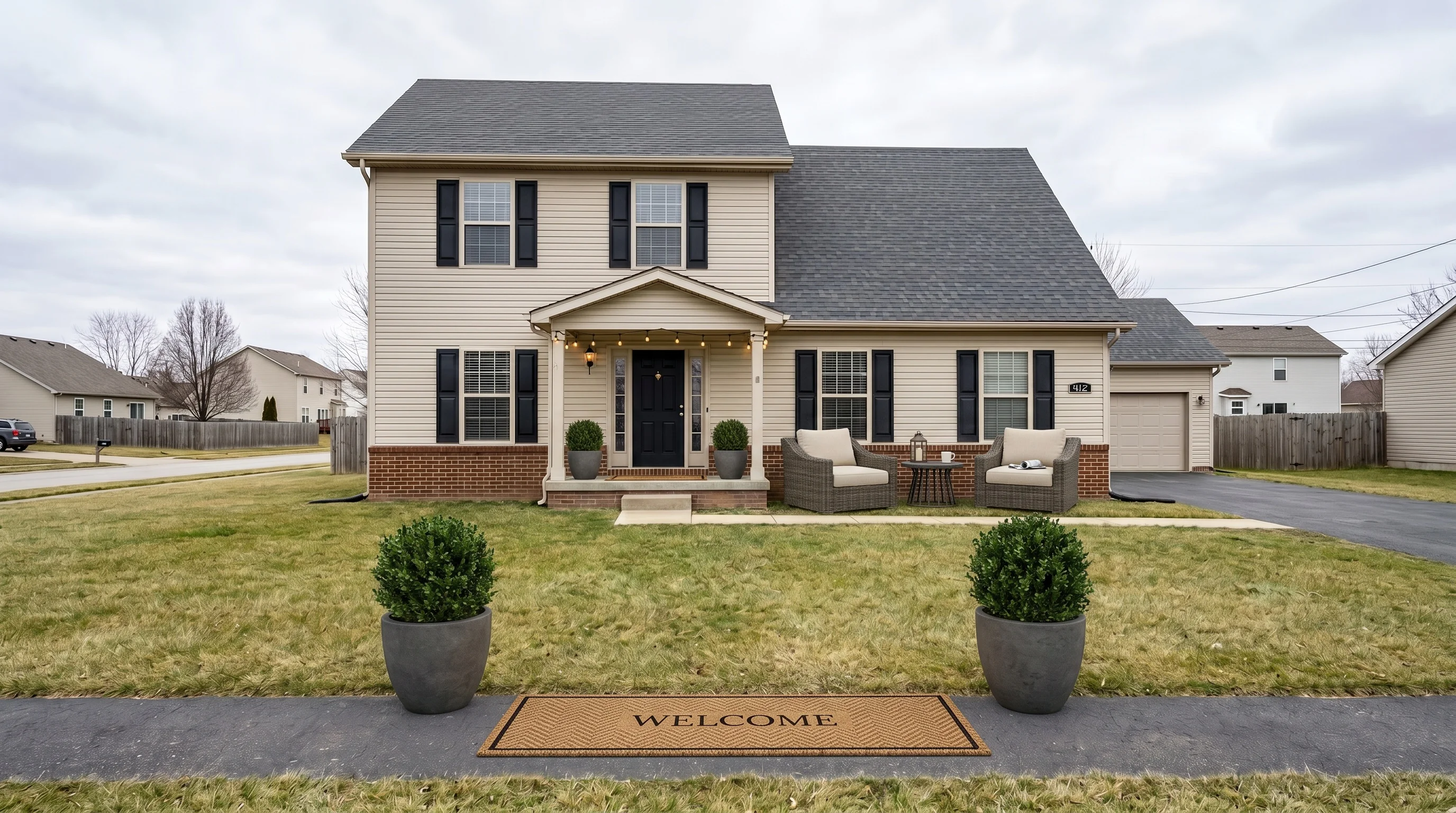
 BeforeCurb appeal
Exterior virtual staging adds furniture and decor to the outdoor spaces in a listing photo — a bistro set on a bare deck, lounge chairs on an empty porch, a couch and rug on a blank concrete patio — so buyers can picture living outside, not just inside. It's the same idea as interior staging, pointed at the parts of the home most agents leave empty.
It also sits closer to an MLS compliance line than interior staging does, because the outside of a house is where "staging" and "misrepresenting the property" are easiest to confuse. This guide covers what's worth staging, where the line actually is, what it costs, and how to keep an exterior render from looking obviously faked.
What exterior virtual staging actually does
Interior virtual staging fills empty rooms. Exterior staging does the same job for everything outside the walls: front porches, back decks, patios, balconies, and the occasional side yard. You upload a photo of the empty space, pick a style, and the tool renders outdoor furniture and decor into it — furniture that never has to be rented, delivered, or hauled back out.
The distinction that matters for real estate is what changes in the frame:
- Staging adds movable things. Patio furniture, an outdoor rug, planters, string lights, a grill, a welcome mat. All of it is stuff a buyer could add themselves the week they move in. Nothing about the house itself is different.
- It should not change the property. The siding, the roof, the fence, the actual lawn, the neighboring houses, and any permanent structure stay exactly as photographed. The moment a render "improves" one of those, you've left staging and entered a disclosure problem — more on that below.
Kept to the first bucket, exterior staging is the cheapest way to make a vacant outdoor space read as usable square footage instead of dead space a buyer scrolls past.
The three outdoor spaces worth staging
Most listings have one or two of these. Each stages a little differently.
Back decks and yards
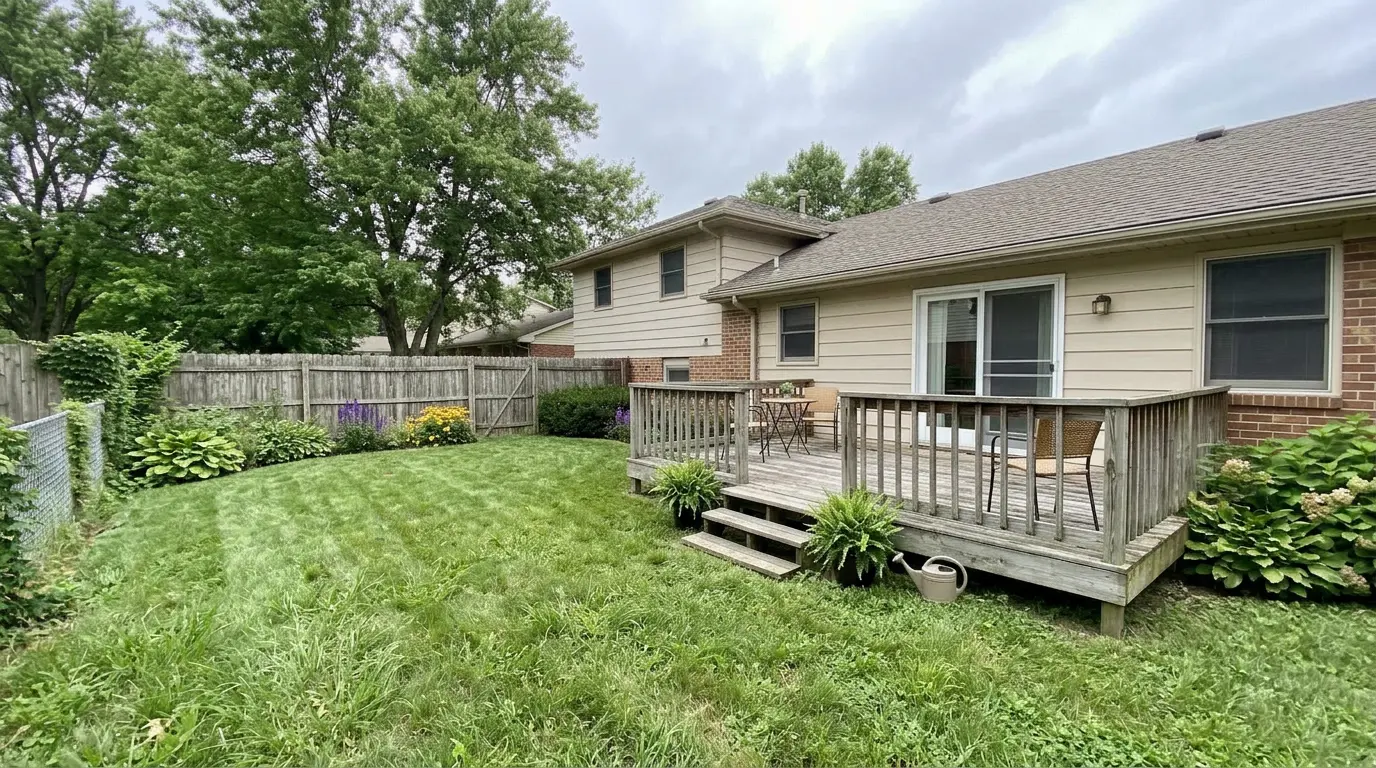
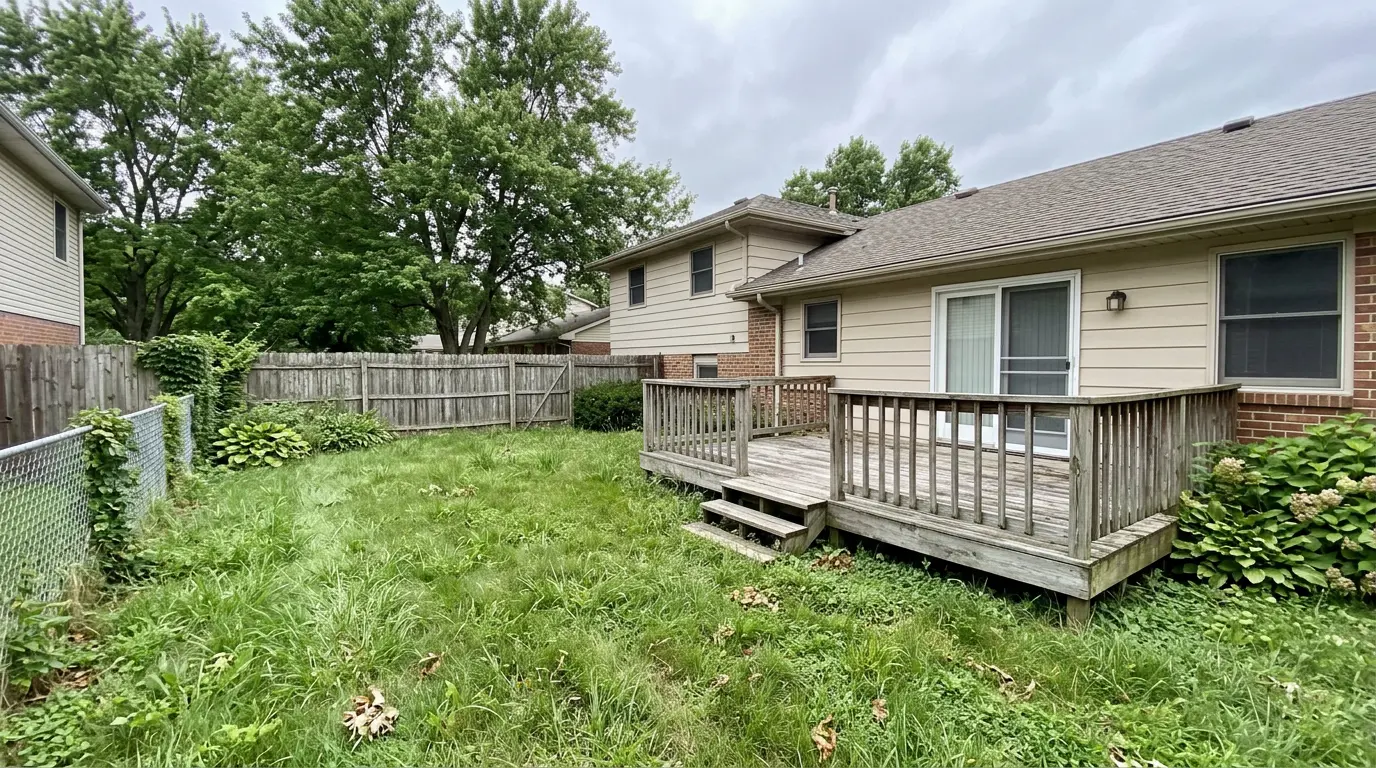
A wooden deck off the back of the house is the highest-value exterior stage: it's usually the second outdoor photo in a listing after the front, and vacant decks read as "nothing to do here." A small bistro table and two chairs, a couple of potted plants at the steps, and the deck instantly becomes a place to have coffee. Keep the furniture in scale — a full patio sectional on a 10-foot deck looks fake at thumbnail size.
One honest caveat, visible in the example above: the render also tidied the overgrown grass into a mowed lawn. Furniture is fair game; the lawn is not. Cleaning up or replacing a lawn changes the property's real condition, and that's the kind of edit you have to disclose (and in many states, shouldn't make at all). We'll come back to why in the next section.
Patios and city courtyards
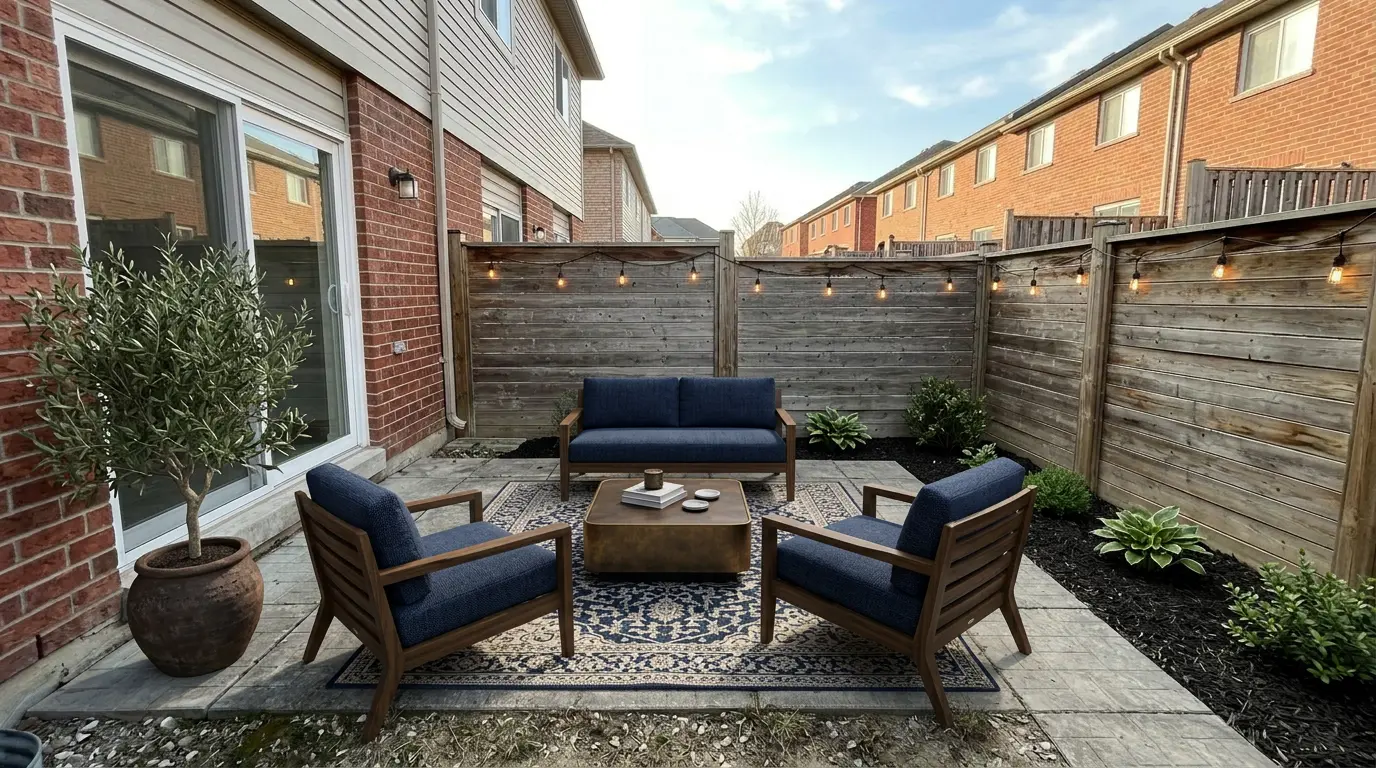
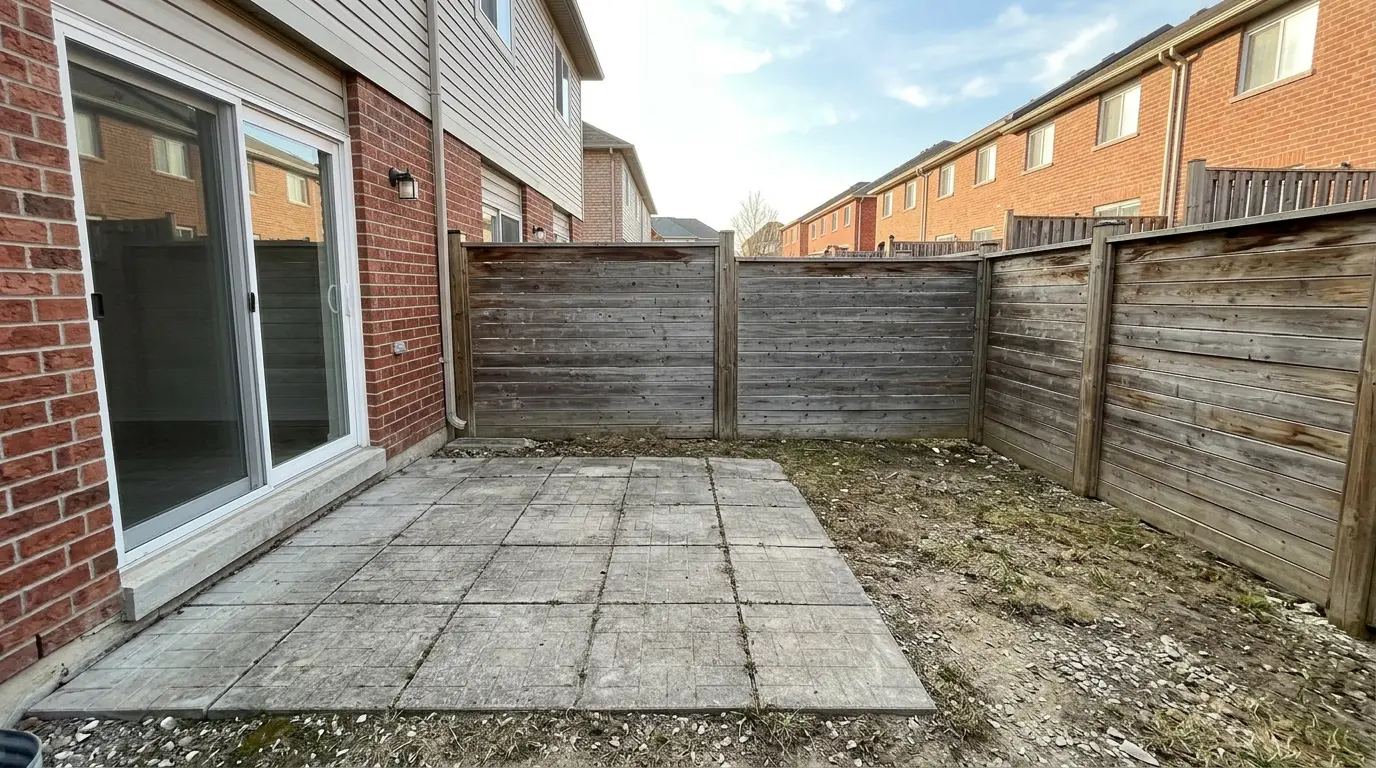
Townhouses, condos, and city homes often have a small paved patio behind a privacy fence — a blank slab that photographs as an afterthought. This is where exterior staging earns the most, because a bare patio and a furnished one send completely different messages about square footage. A loveseat, two chairs, an outdoor rug to define the space, and a planter or two turns "concrete pad" into "outdoor living room." String lights along the fence do a lot of work for very little visual clutter.
Front porches and curb appeal
The header image up top is a front porch: an empty stoop becomes a small seating vignette with two lounge chairs, matching planters flanking the door, and a welcome mat. Front-of-house is the first photo buyers see, so a little warmth there sets the tone for the whole set. Note what didn't change in that render — the siding, the roofline, the driveway, and the winter-dormant lawn are all exactly as shot. That restraint is the point.
If a front or backyard shot still feels flat after staging, the other exterior edit worth knowing is virtual twilight — turning a daytime facade into a warm dusk scene. Staging furnishes the space; twilight changes the light. They fix different problems, and both belong on the same one or two hero shots (front of house, backyard) rather than every photo — and both need the same "virtually staged" or "digitally enhanced" disclosure.
The line you can't cross: staging vs. changing the property
This is the section most tool marketing skips, and it's the one that actually protects you. Interior staging is low-risk because everyone understands an empty bedroom doesn't come with a bed. Outside, the temptation is bigger and the line is easier to cross, because AI tools will happily "improve" the property if you let them.
Here's the working rule: stage the things a buyer would bring; never edit the things the buyer is buying.
Safe — these are movable furnishings, the same category as interior staging:
- Patio and deck furniture, outdoor rugs, cushions
- Planters, potted plants, string lights, a grill, a welcome mat
- Umbrellas and other clearly temporary items
Risky to outright misrepresentation — these change the property's real condition:
- Replacing or greening a lawn. Turning a patchy, dormant, or overgrown yard into lush green grass is the classic exterior overreach. Multiple state real estate boards treat lawn replacement as straightforward misrepresentation unless it's disclosed — it implies a condition the buyer won't find.
- Adding a pool, hot tub, deck, or fence. Rendering an amenity that doesn't exist isn't staging; it's inventing a feature.
- Erasing power lines, neighboring houses, cracks, or stains. Removing real conditions hides what the buyer is actually walking into.
- Repainting siding, fixing a roof, or cleaning up the facade. Those are condition edits, not furnishing.
And the rule that applies to every exterior render, safe or not: label it. Nearly every MLS requires virtually staged photos to be disclosed in the caption ("virtually staged" or "digitally enhanced"), and the NAR and MLS disclosure rules are stricter about exteriors precisely because curb appeal drives the first click. When in doubt, disclose — and keep the original empty photo so you can prove what you changed.
Which style for an outdoor space
Outdoor styling is more forgiving than interior — a few chairs and a rug don't fight the architecture the way a full living room can. Still, matching the vibe to the listing helps. Here's the same city patio in four looks:
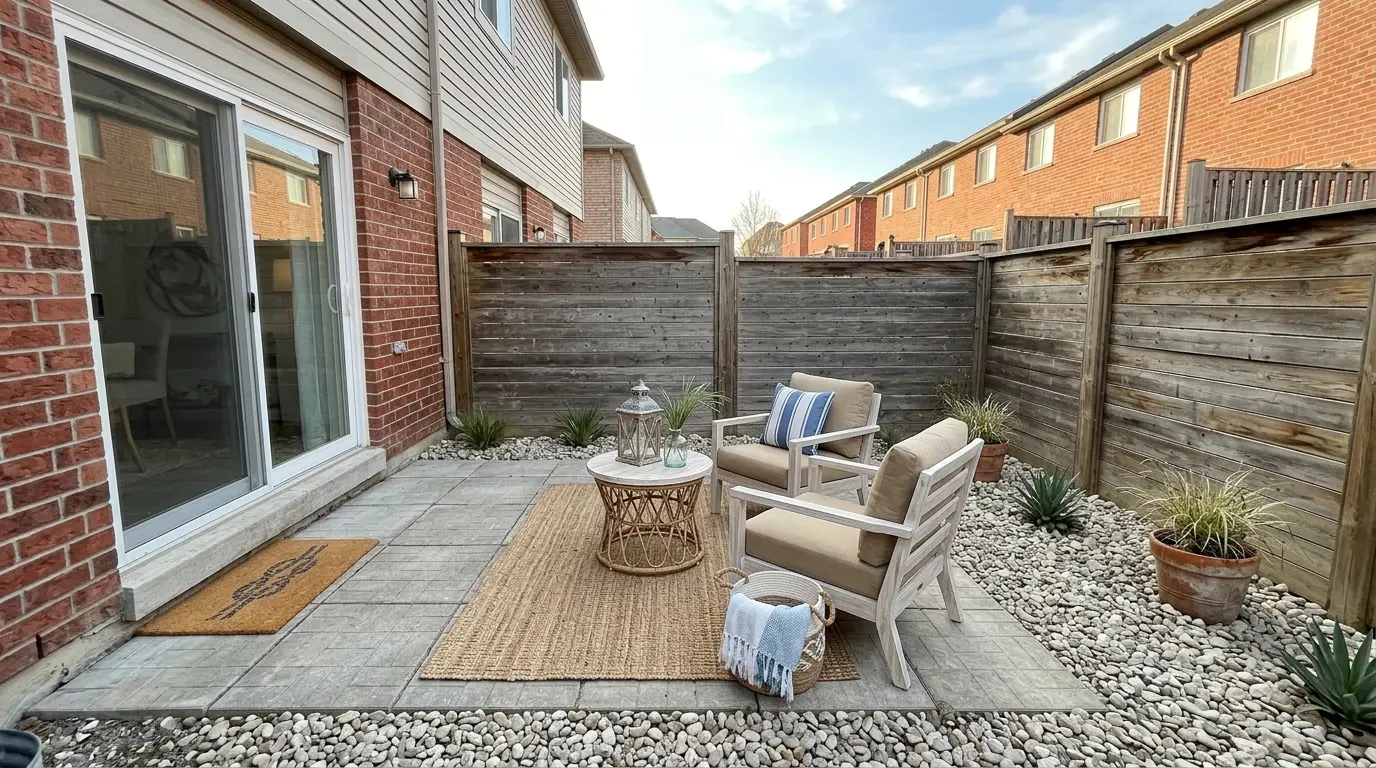
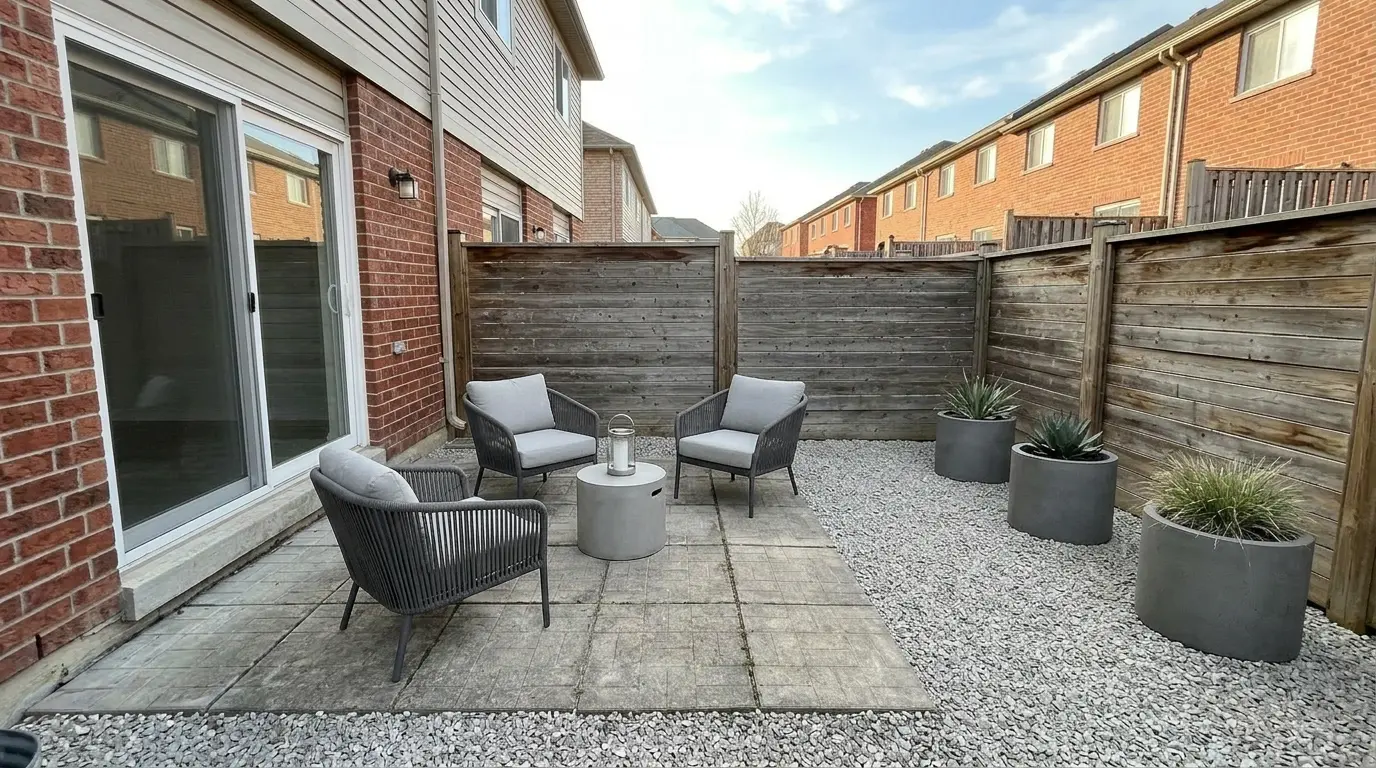
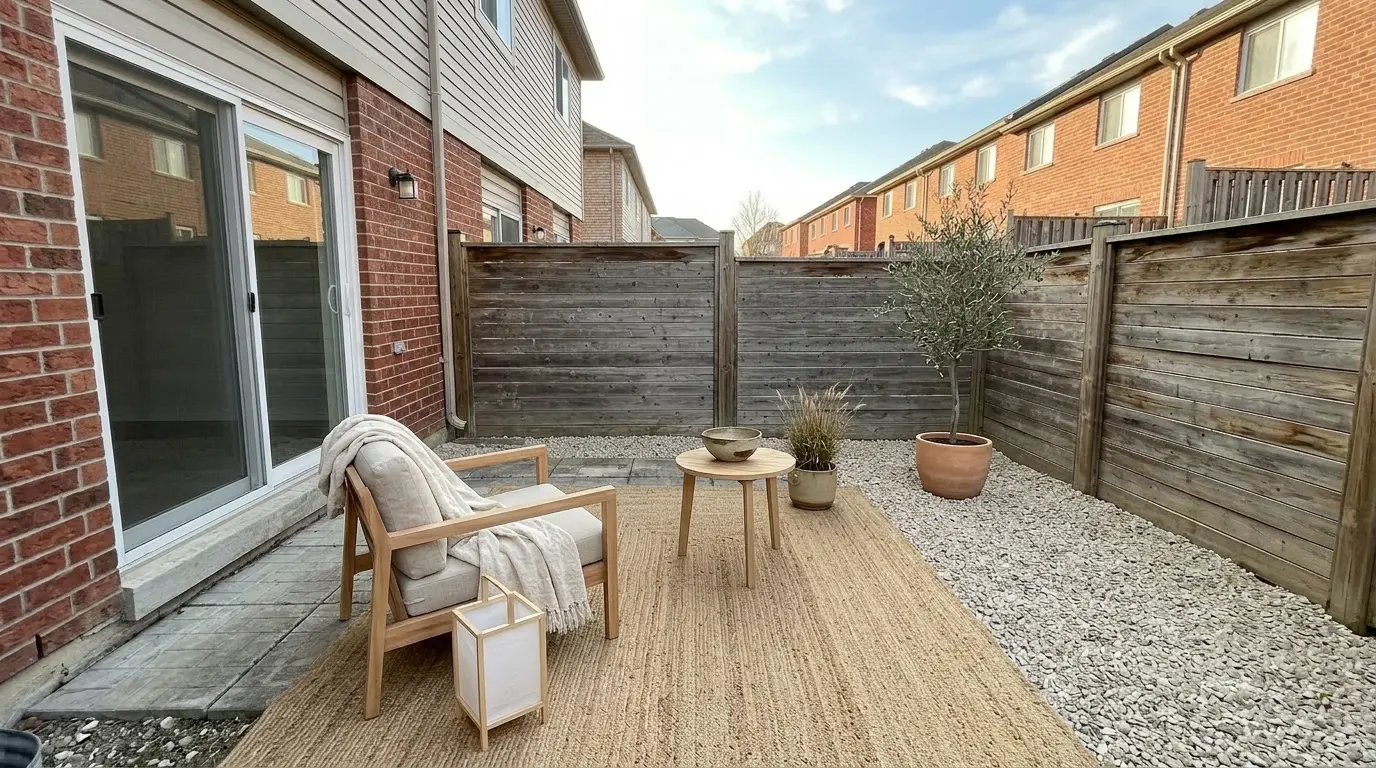
A quick cheat sheet:
| Style | Best for |
|---|---|
| Luxury / modern | Newer builds, higher price points, sleek fences and pavers |
| Coastal | Beach and lake markets, white-trim homes, bright patios |
| Minimalist / Japandi | Condos, townhouses, small courtyards where clutter kills the space |
| Farmhouse / traditional | Suburban single-family with wood decks and classic siding |
Default to whatever matches the home's interior staging so the listing feels like one property, not two.
The cost math: virtual vs. real outdoor setups
The spread is even wider outside than inside, because real outdoor staging means either renting patio furniture or paying a landscaper. Renting outdoor furniture for a listing runs a few hundred dollars a month plus delivery, and it sits outside exposed to weather. Landscaping a yard to look photo-ready — sod, mulch, plantings — runs into four figures fast, and (see above) most of it you can't honestly render anyway.
Exterior virtual staging of the same photo is $5–$15 per image on AI tools, ready in under a minute, with nothing to deliver or return. For a single listing with a porch and a back patio, that's two renders and a cup-of-coffee budget versus a rental contract. It's the same economics that make virtual staging cheaper than physical staging indoors, just with a bigger gap because outdoor furniture rental and landscaping are both expensive.
How to make an exterior render look real
Outdoor renders fail in their own specific ways. A few rules keep them believable:
- Scale to the space, not the frame. A sectional that fills a small patio, or a dining set that crowds a narrow deck, reads as fake immediately. Buyers own patio furniture; they know how big it is.
- Match the light and shadows. If the photo was shot on an overcast afternoon, staged furniture with hard sunny shadows looks pasted in. Most tools handle this, but check the shadow direction against the real ones in the shot.
- Keep the ground plane honest. Furniture legs should sit on the deck boards or pavers, not float above or sink into them. Zoom in on where legs meet the ground before you ship it.
- Don't over-decorate. One rug, a seating set, a couple of planters. The instant it looks like a catalog shoot, buyers stop trusting it.
- Leave the property alone. The single biggest tell — and liability — is a render that also "fixed" the lawn, the fence, or the sky. If it changed something you're not disclosing, re-roll without it.
If a render is off, re-generate once — same photo, same style, different result. Most listings land on a usable exterior shot within two tries.
When exterior virtual staging helps — and when to skip it
It helps most when:
- The outdoor space is vacant and hard to read — a bare deck, an empty patio, a blank porch.
- The listing is in a warm or outdoor-lifestyle market where buyers weight backyard living heavily.
- You're already staging the interior and want the set to feel complete.
Skip it when:
- The space is already furnished and photographs fine — don't restage what works.
- The yard's real problem is condition, not emptiness (dead grass, a broken fence). Staging furniture won't fix that, and editing the condition is the line you can't cross.
- The photo is a wide aerial or drone shot of the whole lot — there's no defined space to furnish, and edits there stray toward misrepresentation fast.
How to stage an exterior photo with VirtualStaging.tools
The workflow is the same as real estate virtual staging indoors:
- Shoot the space empty, level and wide, with the deck, patio, or porch clearly framed. Overcast light is fine and often easier to match.
- Upload the photo — JPG, PNG, WebP, or iPhone HEIC, up to 20 MB.
- Pick the outdoor space and a style that matches your interior staging.
- Generate — usually under a minute. Compare it against the empty original and confirm nothing but the furniture changed.
- Re-roll if the scale or shadows are off, then add the "virtually staged" caption before it goes on the MLS.
The free tier covers 3 staged photos for life — enough to test a real porch or patio before you commit to a paid plan. No credit card to start.
Frequently Asked Questions
What is exterior virtual staging?
Exterior virtual staging digitally adds outdoor furniture and decor — patio sets, deck chairs, rugs, planters, string lights — to a photo of an empty outdoor space so buyers can picture using it. It's the same technique as interior virtual staging, applied to porches, decks, patios, and balconies. Done properly it only adds movable furnishings and leaves the actual property — lawn, siding, fences, structures — unchanged.
Is exterior virtual staging allowed on the MLS?
Yes, as long as you disclose it. Nearly every MLS requires virtually staged photos to be labeled in the caption, usually as "virtually staged" or "digitally enhanced." Exteriors get extra scrutiny because curb appeal drives the first click. The catch is scope: adding furniture is standard staging, but editing the property itself — greening the lawn, adding a pool, erasing a neighbor's house — can cross into misrepresentation even with a disclosure. Check your local MLS rules; they vary by board.
Can you virtually stage a backyard or patio?
Yes. Backyards, decks, and patios are among the most valuable spaces to stage because vacant ones read as unusable. A bistro set on a deck or a sofa-and-rug arrangement on a bare patio turns dead space into an outdoor room. Keep the furniture in scale for the space, and stage only the furniture — not the grass, fence, or landscaping.
How do you stage an outdoor patio?
Shoot the patio empty, level, and wide with the whole slab in frame. Upload it, pick the outdoor space and a style that matches your interior staging, and let the tool render a seating set. Scale the furniture to the patio — a loveseat and two chairs for a small courtyard, not a full sectional — add an outdoor rug to anchor the space and a planter or two, then re-roll if the scale or shadows look off. Stage furniture only, and caption it "virtually staged" before it hits the MLS.
Is it legal to virtually stage a lawn to look greener?
This is the main exterior red line. Turning a patchy, brown, or overgrown lawn into lush green grass changes the property's real condition, and several state real estate boards treat lawn replacement as misrepresentation unless it's disclosed — and sometimes even then. Adding furniture is safe; recoloring or "fixing" the lawn is not. If the yard's problem is condition rather than emptiness, the honest fix is real cleanup before the shoot, not an edit.
How much does exterior virtual staging cost?
Typically $5–$15 per photo on AI staging tools, ready in under a minute. VirtualStaging.tools includes 3 staged photos free for life, then moves to subscription pricing. Compare that with renting outdoor furniture (a few hundred dollars a month plus delivery) or landscaping a yard for photos (often four figures), and the virtual route is dramatically cheaper for a single listing.
What's the difference between exterior virtual staging and interior staging?
The technique is identical — add furniture to an empty space in a photo. The difference is risk. Interior staging is low-controversy because everyone knows an empty bedroom doesn't include a bed. Outside, it's easier to slip from furnishing into altering the property (lawn, fence, pool, siding), which is where disclosure and misrepresentation rules kick in. Exterior staging needs the same "furniture only" discipline plus a clear MLS caption.
Can I add a pool or fire pit with virtual staging?
You can, but you shouldn't. A pool, hot tub, fire pit, or built deck is a permanent feature, not furniture — rendering one that doesn't exist invents an amenity and misrepresents the property. That's a fast route to an MLS complaint. Stick to clearly movable items (chairs, rugs, planters, a portable grill) and leave permanent structures out.
Does exterior virtual staging work on a phone photo?
Yes. Recent phone cameras shoot well enough for exterior staging. Frame the space level and wide with the deck, patio, or porch clearly in view, and avoid Portrait mode — the depth blur confuses the staging. Overcast light actually works well outdoors and is easier for the tool to match than harsh midday sun. JPG and HEIC both upload fine.
How do I disclose a virtually staged exterior photo?
Add a short caption to the photo on the MLS — "virtually staged" or "digitally enhanced" is standard — and keep the original empty photo on file. Some boards want the unedited shot included in the listing alongside the staged one. Because exteriors influence the first impression so heavily, err toward more disclosure, not less, and never let a staged exterior be the only version of a space a buyer sees before a showing.
What are the most common curb appeal mistakes?
In virtual staging specifically, the biggest mistake is overreaching the edit — "greening" a dormant lawn, erasing power lines or a neighbor's house, or adding landscaping that isn't there. Those misrepresent the property and invite an MLS complaint. The next most common are furniture out of scale for the space, over-decorating until it looks like a catalog shoot, and forgetting the disclosure caption. The front photo sets the tone for the whole listing, so keep it warm but honest: add a seating vignette and planters, leave the house itself exactly as photographed.
Can I virtually stage my own home to sell?
Yes. You don't need a photographer or a service — a level, wide phone photo of an empty deck or patio is enough to start. Free and low-cost AI tools let owners and agents stage their own listings; VirtualStaging.tools gives you 3 staged photos free for life to try it. The same rules apply whether you're an agent or a for-sale-by-owner seller: stage the furniture, leave the property alone, and disclose the edit on the listing.
Which outdoor spaces are worth staging?
The empty, hard-to-read ones: vacant back decks, blank concrete patios, and bare front porches, in that rough order of value. A furnished porch warms the first listing photo; a staged patio or deck shows buyers how outdoor square footage can be used. Skip aerial or whole-lot drone shots — there's no defined space to furnish, and edits at that scale drift toward misrepresentation.
More from the blog
Related reading
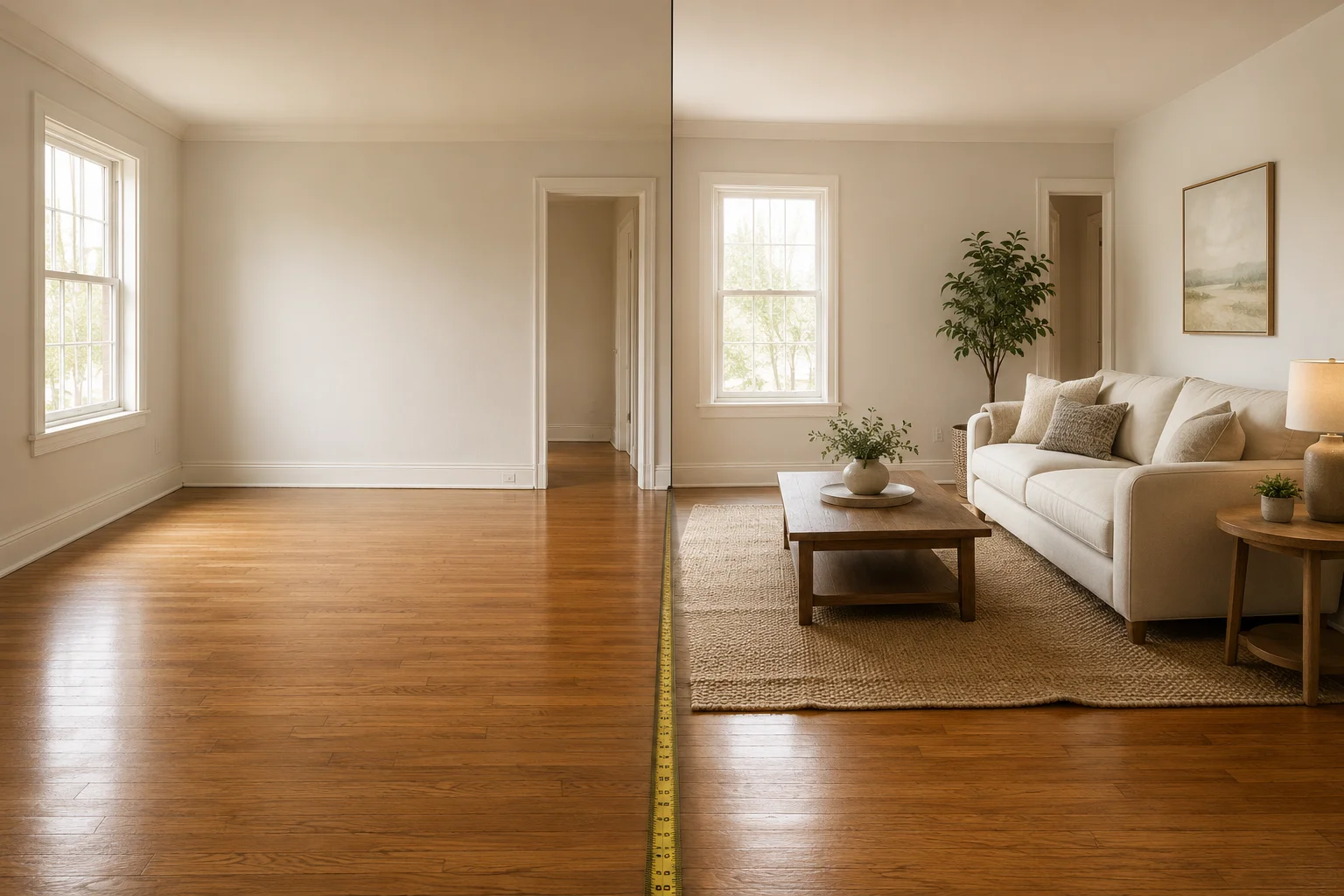
What Virtual Staging Should Never Change (Checklist)
A pre-MLS checklist for what AI virtual staging should never alter, and how to spot hallucinated details before you publish a listing photo.
Virtual Staging Photos: How to Get Listing-Ready Shots
What virtual staging photos are, how to get great ones, and the MLS disclosure rules — a practical 2026 guide for agents staging their own listings.

How to Write Instructions AI Staging Will Follow
We tested five staging instructions on real listing photos. The four that worked share one trait — and the one that failed shows the model's limit.